



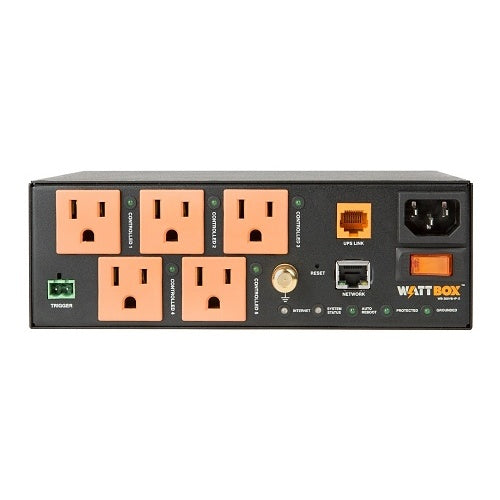
WattBox WB-300VB-IP-5 5-Outlet VersaBox IP Power Conditioner

In stock

5-outlet IP power conditioner for VersaBox, media walls, structured wiring cans, routers, streamers, displays, and smart home gear. Built for OvrC remote reboot, auto recovery, surge protection, and cleaner hidden installs.

Sale price$471.99 USD Regular price$588.99 USD
Save 20%

Tax excluded. Shipping calculated at checkout

Free U.S. shipping is available on orders over $499.99.

Authorized seller with manufacturer warranty, tracked U.S. shipping, and real help before and after your purchase.
Need help with product fit, compatibility, or setup?
Contact us or call (949) 944-2327

Official Product Resources

WB-300VB-IP-5 Product Manual & Specs

View the official WB-300VB-IP-5 manual for product specifications, setup details, wiring guidance, and installation reference before ordering.

Open WB-300VB-IP-5 Manual PDF

Opens the official PDF manual in a new tab, where you can view, save, or print the file from your browser.

WattBox WB-300VB-IP-5 5-Outlet VersaBox IP Power Conditioner

Product Details

Smart In-Wall Power Control for Hidden AV and Network Installs

This WattBox IP power conditioner is designed for installations where the equipment is hidden, but still needs to be easy to control and service. It is a strong fit for media walls, behind-TV systems, digital signage, kiosks, structured wiring cans, and small AV or network setups where traditional rack power equipment does not fit.

The main advantage is remote power control. Instead of opening a cabinet, removing a display, or sending someone on-site just to unplug a frozen device, you can power-cycle individual outlets through the network when the system is configured properly.

Best Use Cases

  • Media wall installations: Ideal when streamers, control hubs, small network devices, or display equipment are hidden behind a TV or inside an enclosure.
  • VersaBox and structured wiring setups: A compact fit for Strong VersaBox, VersaMount, and compatible structured wiring enclosure projects.
  • Digital signage and kiosks: Useful when a display, media player, or small network device needs remote reboot control without physical access.
  • Smart home systems: Helps manage hubs, bridges, control processors, and other low-power connected devices that occasionally need a reset.
  • Small network installs: A good fit for routers, small switches, access points, and supporting network gear in tight spaces.

Who Should Buy This?

This is a good choice if you need smart power control in a tight or hidden installation. It is especially useful for AV installers, smart home professionals, IT companies, security installers, property managers, and homeowners who want a cleaner setup with easier remote troubleshooting.

It makes the most sense when access is inconvenient. If the device is behind a display, inside a wall box, inside a cabinet, or in a structured wiring location, remote outlet control can save time and reduce unnecessary service calls.

Who Should Not Buy This?

This is not the right product if you only need a basic power strip or a simple surge protector. It is also not a UPS battery backup, so it will not keep equipment running during a power outage unless the system is paired with a separate UPS.

It is also not intended for high-draw devices such as heaters, power tools, large amplifiers, large appliances, laser printers, or equipment that exceeds the supported power rating. For larger racks or higher outlet counts, a larger WattBox power conditioner may be a better fit.

Compatibility Notes

  • Outlet layout: Includes 5 separately controlled NEMA 5-15 outlets.
  • Power input: Designed for 120V, 60Hz power.
  • Current rating: 15A circuit breaker rating with a 12A UL current rating.
  • Surge protection: Rated at 2160 joules with ceramic-encased MOV surge components.
  • Noise filtration: Provides EMI/RFI noise filtration across all outlets.
  • Network control: Uses an RJ45 LAN connection for IP control, monitoring, OvrC setup, and local web interface access.
  • UPS Link: Includes UPS Link for compatible WattBox power setups.
  • Mounting: Designed for VersaBox, structured wiring enclosures, surface mounting, wall mounting, behind-TV spaces, and tight AV/network installs.

Installation Considerations

Before installing this unit, plan which devices should go on each controlled outlet. A clean setup usually separates the always-on network chain from devices that may need occasional reboots, such as streaming players, control hubs, media players, signage devices, or small network components.

For the best service experience, label each connected device and outlet during installation. That makes future troubleshooting easier, especially when the power conditioner is hidden behind a TV, inside a VersaBox, or inside a structured wiring enclosure.

If you plan to use OvrC or IP control, connect the unit to the local network with Ethernet and configure it properly during installation. For reliable network management, a planned IP setup is better than treating the unit like a basic power strip.

Why Remote Reboot Matters

Many AV, network, and smart home problems are not full equipment failures. Sometimes a streamer freezes, a hub stops responding, a router needs a restart, or a display device loses communication. With individually controlled outlets, you can reboot the right device instead of cutting power to the entire setup.

That is the real value of this product. It helps turn hidden equipment from a service headache into something easier to manage after the installation is complete.

Good Products to Pair With This Power Conditioner

Need Help Planning the Outlet Layout?

If you are not sure what should plug into each controlled outlet, send us the list of devices in your media wall, cabinet, or structured wiring enclosure. We can help you decide what should stay always-on, what should be remotely rebootable, and whether this 5-outlet model gives you enough room for the project.

Smart In-Wall Power Control for Hidden AV and Network Installs

This WattBox IP power conditioner is designed for installations where the equipment is hidden, but still needs to be easy to control and service. It is a strong fit for media walls, behind-TV systems, digital signage, kiosks, structured wiring cans, and small AV or network setups where traditional rack power equipment does not fit.

The main advantage is remote power control. Instead of opening a cabinet, removing a display, or sending someone on-site just to unplug a frozen device, you can power-cycle individual outlets through the network when the system is configured properly.

Best Use Cases

  • Media wall installations: Ideal when streamers, control hubs, small network devices, or display equipment are hidden behind a TV or inside an enclosure.
  • VersaBox and structured wiring setups: A compact fit for Strong VersaBox, VersaMount, and compatible structured wiring enclosure projects.
  • Digital signage and kiosks: Useful when a display, media player, or small network device needs remote reboot control without physical access.
  • Smart home systems: Helps manage hubs, bridges, control processors, and other low-power connected devices that occasionally need a reset.
  • Small network installs: A good fit for routers, small switches, access points, and supporting network gear in tight spaces.

Who Should Buy This?

This is a good choice if you need smart power control in a tight or hidden installation. It is especially useful for AV installers, smart home professionals, IT companies, security installers, property managers, and homeowners who want a cleaner setup with easier remote troubleshooting.

It makes the most sense when access is inconvenient. If the device is behind a display, inside a wall box, inside a cabinet, or in a structured wiring location, remote outlet control can save time and reduce unnecessary service calls.

Who Should Not Buy This?

This is not the right product if you only need a basic power strip or a simple surge protector. It is also not a UPS battery backup, so it will not keep equipment running during a power outage unless the system is paired with a separate UPS.

It is also not intended for high-draw devices such as heaters, power tools, large amplifiers, large appliances, laser printers, or equipment that exceeds the supported power rating. For larger racks or higher outlet counts, a larger WattBox power conditioner may be a better fit.

Compatibility Notes

  • Outlet layout: Includes 5 separately controlled NEMA 5-15 outlets.
  • Power input: Designed for 120V, 60Hz power.
  • Current rating: 15A circuit breaker rating with a 12A UL current rating.
  • Surge protection: Rated at 2160 joules with ceramic-encased MOV surge components.
  • Noise filtration: Provides EMI/RFI noise filtration across all outlets.
  • Network control: Uses an RJ45 LAN connection for IP control, monitoring, OvrC setup, and local web interface access.
  • UPS Link: Includes UPS Link for compatible WattBox power setups.
  • Mounting: Designed for VersaBox, structured wiring enclosures, surface mounting, wall mounting, behind-TV spaces, and tight AV/network installs.

Installation Considerations

Before installing this unit, plan which devices should go on each controlled outlet. A clean setup usually separates the always-on network chain from devices that may need occasional reboots, such as streaming players, control hubs, media players, signage devices, or small network components.

For the best service experience, label each connected device and outlet during installation. That makes future troubleshooting easier, especially when the power conditioner is hidden behind a TV, inside a VersaBox, or inside a structured wiring enclosure.

If you plan to use OvrC or IP control, connect the unit to the local network with Ethernet and configure it properly during installation. For reliable network management, a planned IP setup is better than treating the unit like a basic power strip.

Why Remote Reboot Matters

Many AV, network, and smart home problems are not full equipment failures. Sometimes a streamer freezes, a hub stops responding, a router needs a restart, or a display device loses communication. With individually controlled outlets, you can reboot the right device instead of cutting power to the entire setup.

That is the real value of this product. It helps turn hidden equipment from a service headache into something easier to manage after the installation is complete.

Good Products to Pair With This Power Conditioner

Need Help Planning the Outlet Layout?

If you are not sure what should plug into each controlled outlet, send us the list of devices in your media wall, cabinet, or structured wiring enclosure. We can help you decide what should stay always-on, what should be remotely rebootable, and whether this 5-outlet model gives you enough room for the project.

RELATED PRODUCTS

Discover Other Products You Might Like and Simplify Your Search