



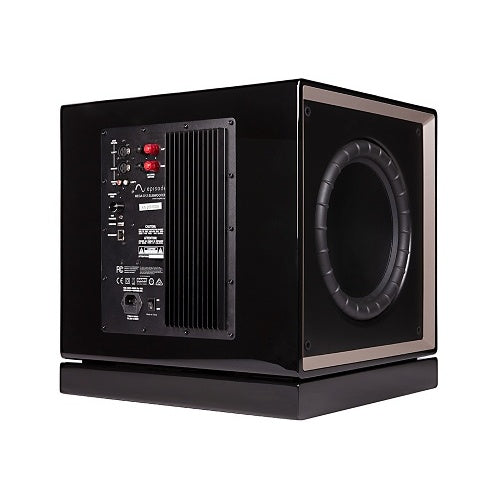
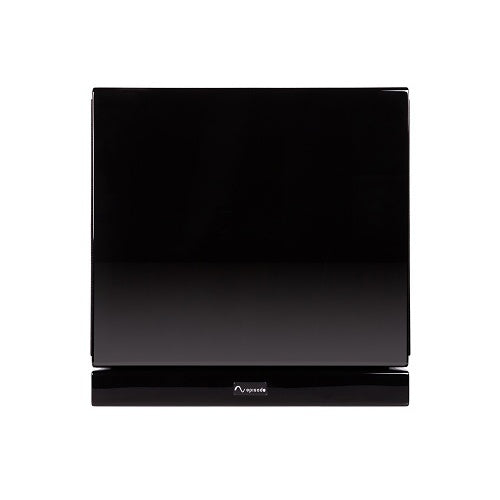
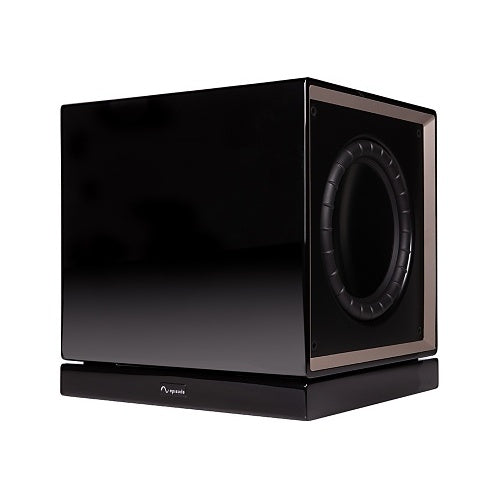
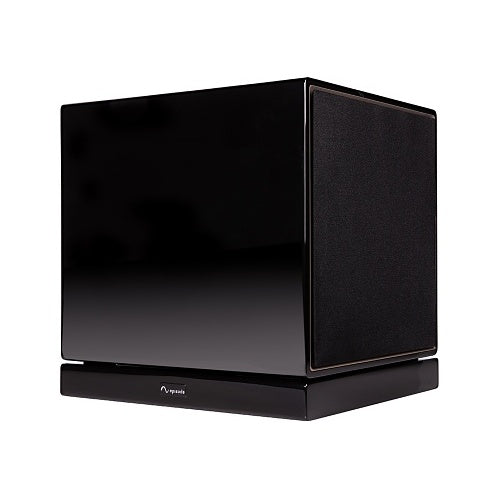
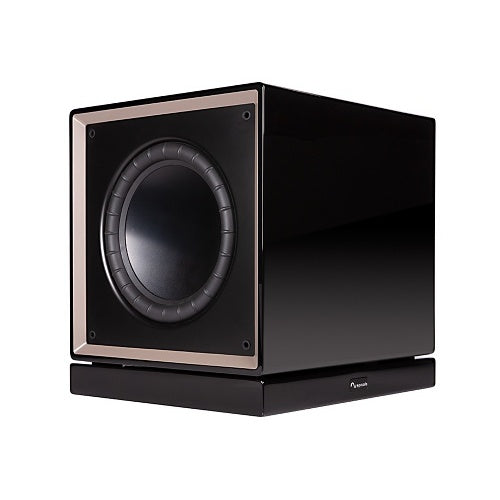
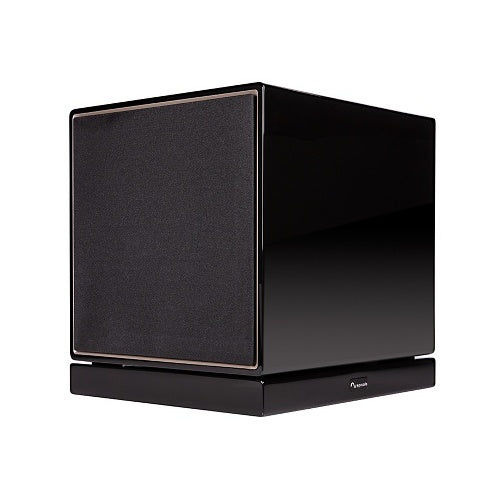
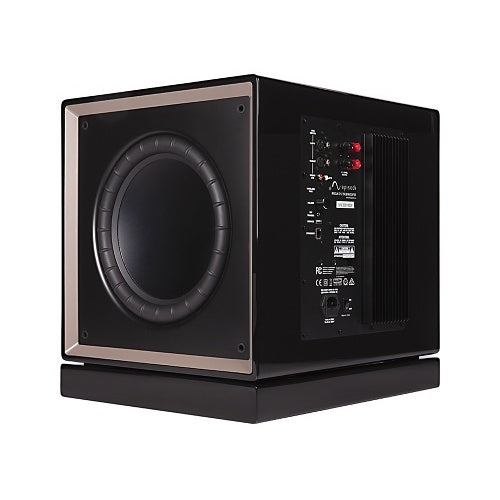
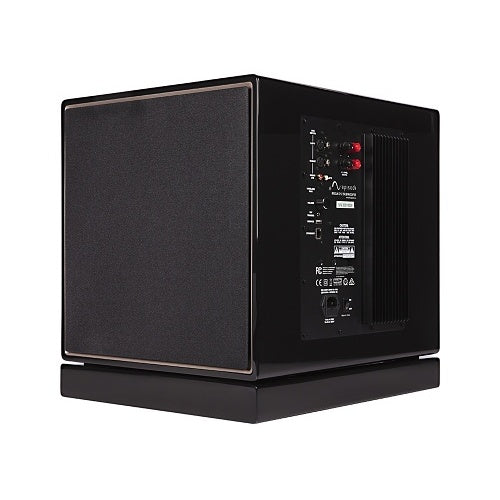
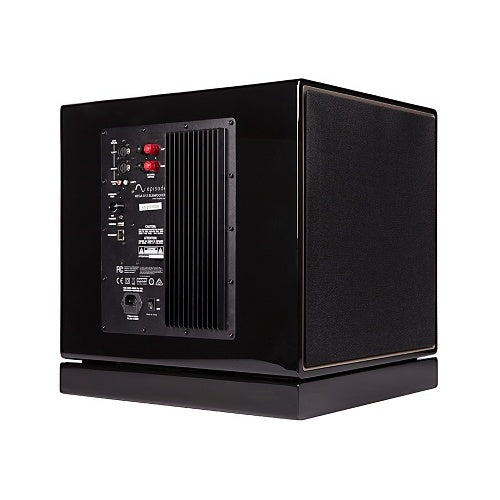
Episode ES-SUB-MEGA-D12-BLK Wireless 12 Inch 1000W Subwoofer
Flagship powered subwoofer for demanding home theaters, large media rooms, and high-performance music systems. Features dual active 12-inch drivers, 1000W RMS/2000W peak BASH amplification, a sealed cabinet, 17Hz–250Hz response, automatic room EQ, app-controlled DSP, XLR/RCA/speaker-level inputs, Ethernet, a 12V trigger, and a built-in wireless receiver. Optional wireless transmitter sold separately.
Tax excluded. Shipping calculated at checkout
Free U.S. shipping is available on orders over $499.99.
Personalized pricing may be available for a single item, multiple products, larger quantities, or competitive quotes.
Before You Buy
Check compatibility, what’s included, key specifications, and installation requirements in the Product Details below. Need help confirming compatibility? Contact us before ordering.
Shipping Information
A tracking number is provided by email after the order has shipped. U.S. only: Orders usually process in 1 to 2 business days, with delivery typically taking 3 to 6 business days after shipment. Free shipping on orders over $499.99 For more information, please see our Shipping Policy here.
30 Day Returns & Warranty
We accept returns within 30 days of delivery for unused, uninstalled items in original packaging. Many products also include a manufacturer warranty. For more information, please see our Refund Policy here.
Official Product Resources
ES-SUB-MEGA-D12-BLK Product Manual & Specs
View the official ES-SUB-MEGA-D12-BLK manual for product specifications, setup details, wiring guidance, and installation reference before ordering.
Open ES-SUB-MEGA-D12-BLK Manual PDFOpens the official PDF manual in a new tab, where you can view, save, or print the file from your browser.
Episode ES-SUB-MEGA-D12-BLK Wireless 12 Inch 1000W Subwoofer
Product Details
Flagship Dual 12-Inch Bass for Demanding Rooms
The Episode ES-SUB-MEGA-D12-BLK is a high-output powered subwoofer designed for demanding home theaters, large media rooms, open living spaces, gaming systems, and serious two-channel music systems.
Its sealed cabinet contains two active 12-inch drivers powered by a 1000W RMS BASH hybrid amplifier. A published 17Hz low-frequency response, automatic room EQ, app-controlled DSP, balanced and unbalanced inputs, Ethernet control, a 12V trigger, and optional wireless audio support provide substantial performance and installation flexibility.
This is the polished gloss-black model. The wireless receiver is built into the subwoofer, but the ES-SUB-WIFI-TX-MEGA transmitter required to send audio wirelessly is sold separately.
Best Use Cases
- Dedicated home theaters: Reproduce demanding low-frequency effects with greater extension and output than smaller subwoofer models.
- Large media rooms: Support movies, television, gaming, and streaming content in rooms where a compact subwoofer may run out of headroom.
- Open-plan living spaces: Provide stronger bass capability for rooms connected to kitchens, dining areas, hallways, or other open spaces.
- High-performance music systems: Extend floorstanding, bookshelf, in-wall, or monitor speakers into the lowest musical frequencies.
- Systems with balanced outputs: Connect compatible processors or preamplifiers through the D-Series XLR inputs.
- Rooms with uneven bass: Use automatic room EQ, phase, delay, and parametric EQ to improve integration at the listening position.
- Control-system installations: Use Ethernet/IP control or the 12V trigger with compatible AV and automation equipment.
- Wireless retrofits: Add the optional Episode transmitter when running a long RCA or XLR cable is impractical.
Who Should Buy This?
This is a strong choice if you need the deepest extension, greatest amplifier output, and largest drivers available in Episode’s MEGA D-Series.
It is particularly suitable for systems where dual active drivers, a sealed enclosure, 17Hz extension, automatic calibration, balanced connectivity, and advanced control options are more important than compact cabinet size.
Who Should Not Buy This?
This may be more subwoofer than a small bedroom, office, or secondary television system requires. The cabinet is substantial, weighs approximately 82.9 lb, and should be selected according to the room, listening level, and available placement locations.
This is not a passive subwoofer. It contains its own amplifier and requires a suitable indoor AC power connection.
It is not completely wireless. Wireless operation replaces the long source-signal cable, but the subwoofer still requires AC power and the separately sold ES-SUB-WIFI-TX-MEGA transmitter.
Bluetooth is used for control and setup through the Episode MEGA app. It is not documented as a Bluetooth music-streaming input.
The ES-SUB-MEGA-D12 is designed for dry indoor use. Do not expose it to rain, dripping water, excessive humidity, blocked ventilation, or direct heat sources.
Sold Individually
The ES-SUB-MEGA-D12-BLK is sold as one complete powered subwoofer.
One D12 may provide sufficient output for many systems, while two properly positioned subwoofers can improve bass consistency across several seats.
The Episode MEGA app can identify, control, and calibrate multiple compatible MEGA subwoofers independently.
Dual Active 12-Inch Drivers
The ES-SUB-MEGA-D12 uses two active 12-inch drivers.
Both drivers are powered by the internal amplifier. This is not a design with one powered woofer and one passive radiator.
The drivers use aluminum-reinforced paper cones and large 2.5-inch voice coils. Episode combines them with a sealed, internally braced cabinet intended to deliver substantial output while limiting unwanted enclosure movement.
Sealed and Internally Braced Cabinet
The D12 uses a sealed enclosure rather than a ported cabinet.
A sealed design is often selected when controlled transient response, deep extension, and integration with music and theater speakers are priorities.
Actual in-room performance still depends on placement, room dimensions, construction, seating position, crossover settings, phase, delay, and equalization.
1000W RMS and 2000W Peak Amplification
The built-in BASH hybrid amplifier is rated at 1000W RMS and 2000W peak.
The 1000W specification is the continuous RMS rating and should be used as the primary amplifier figure. The 2000W figure is a peak rating and should not be presented as continuous output.
No separate external subwoofer amplifier is required.
17Hz–250Hz Frequency Response
The official published frequency response is 17Hz to 250Hz.
The 17Hz low-frequency specification gives the D12 the deepest published extension in Episode’s current MEGA D-Series and allows it to reproduce very low movie effects and musical content.
Room acoustics may increase some bass frequencies while reducing others at particular seats. Reaching 17Hz on the specification sheet does not eliminate the need for thoughtful placement and calibration.
Adjustable 40Hz–150Hz Low-Pass Range
The published low-pass adjustment range is 40Hz to 150Hz.
The correct setting depends on the main speakers, receiver or processor configuration, room, and whether bass management is being handled by the source equipment or by the subwoofer.
When using an AV receiver’s LFE output and crossover system, avoid applying unnecessary or conflicting crossover settings in both devices.
Published 96 dB CTA-2010 Measurement
Episode publishes a 96 dB ANSI/CTA-2010 SPL measurement at 2 meters for the D12.
This is a powered-subwoofer output measurement. It should not be described as a conventional passive-speaker sensitivity specification.
Automatic Room EQ
The Episode MEGA app includes automatic room equalization.
The calibration process uses test sweeps and the compatible mobile device’s microphone to measure the subwoofer near the cabinet and at the listening position. The app then creates and applies an equalization curve based on the measured result.
The calibration remains stored until another measurement replaces it. Automatic EQ can also be enabled or disabled through the app.
Room EQ can reduce measurable response problems at the calibration position, but it cannot completely overcome unsuitable placement, severe acoustic cancellations, poor seating locations, or structural rattles.
Calibrate the Subwoofer Before the Receiver
When the AV receiver or processor also provides automatic room correction, complete the MEGA subwoofer calibration first.
After the subwoofer has been measured and adjusted through the Episode app, run the receiver or processor’s complete speaker-calibration routine.
Final crossover, level, phase, distance, and delay adjustments can then be evaluated from the primary listening positions.
Episode MEGA App Controls
The Episode MEGA app connects through Bluetooth Low Energy using a compatible iOS or Android device.
The app provides access to:
- Volume: Balances subwoofer output with the main speakers.
- Preset modes: Selects Normal, Music, Cinema, or Night.
- Low-pass frequency: Adjusts the upper frequency reproduced by the subwoofer.
- Phase: Helps align the subwoofer with the main speakers.
- Delay: Compensates for timing and distance differences.
- Parametric EQ: Adjusts center frequency, bandwidth, and gain.
- Automatic power behavior: Configures signal- or Ethernet-based operation.
- Automatic EQ: Measures and applies a room-specific correction curve.
Bluetooth should be described as the control connection for the MEGA app, not as an audio-streaming feature.
Normal, Music, Cinema, and Night Modes
- Normal: The standard starting profile for general listening.
- Music: Adds emphasis to the lower bass range for music playback.
- Cinema: Adds emphasis around 50Hz for a more dramatic movie presentation.
- Night: Reduces the maximum subwoofer level for lower-impact evening listening.
Choose the mode according to the source material, room, listening level, and personal preference.
Adjustable Phase and Delay
Phase and delay controls help align the subwoofer with the main speakers at the listening position.
Delay is particularly useful when the subwoofer is physically closer to the listener than the main speakers. Episode notes that approximately 1 millisecond of delay is acoustically similar to moving the subwoofer about 13 inches farther away.
When the receiver already calculates subwoofer distance and timing, avoid unnecessary duplicate adjustments without measuring or listening to the result.
Parametric Equalizer
The app’s parametric equalizer allows adjustment of center frequency, bandwidth, and gain.
This can be used to reduce specific bass peaks or make carefully measured corrections after placement and calibration.
Large boosts should be used cautiously because they increase amplifier demand and driver excursion. Repositioning the subwoofer or reducing a peak is generally safer than attempting to fill a deep room cancellation with extreme boost.
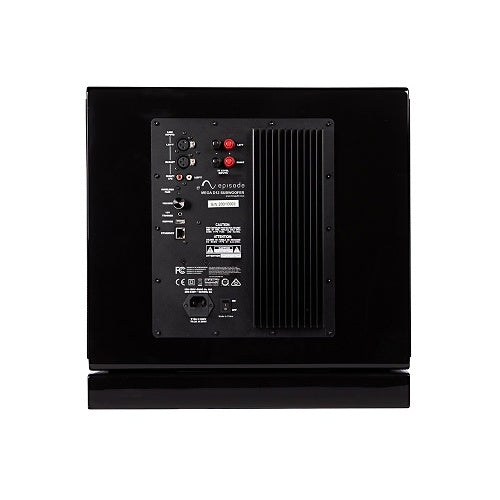
Balanced XLR Inputs
The D-Series provides balanced XLR connections for compatible receivers, processors, and preamplifiers.
Balanced connections may be advantageous for longer cable runs or systems where reducing susceptibility to induced noise is important.
The XLR inputs are a key distinction between the MEGA D-Series and less advanced subwoofer models.
RCA and LFE Inputs
Stereo RCA inputs accept unbalanced line-level audio from compatible source equipment.
The right RCA input also serves as the unbalanced LFE connection for a receiver or processor’s subwoofer output.
Use a well-shielded RCA cable with secure connectors for wired LFE installations.
Speaker-Level Inputs
Gold-plated five-way binding posts accept speaker-level signals from compatible systems that do not provide a suitable line-level subwoofer output.
These terminals are high-level inputs to the powered subwoofer. They are not outputs for powering passive main speakers.
Do not connect XLR, RCA, and speaker-level input types simultaneously. Episode instructs users to connect only one input type at a time.
Built-In Wireless Receiver
The ES-SUB-MEGA-D12 includes a wireless audio receiver.
Wireless operation requires the separately sold ES-SUB-WIFI-TX-MEGA transmitter, which connects to the receiver or processor’s LFE or preamp output.
One transmitter can pair with up to three compatible MEGA subwoofers.
The optional transmitter operates in the 2.4 GHz ISM band and has a published typical maximum range of approximately 50 feet. Walls, furniture, metal structures, wireless interference, and equipment placement may reduce the practical range.
The wireless connection replaces the long audio-signal cable. It does not eliminate the D12’s AC power requirement.
Ethernet and IP Control
An RJ45 Ethernet connection supports IP control and compatible automation-system integration.
Episode publishes control-system drivers and protocol information for supported platforms. Available functions may include power, volume, presets, and status monitoring, depending on the selected system and driver.
The local network interface also provides access to product and network information, including the device name, IP settings, firmware version, MAC address, password, and service tag.
12V Trigger Input
A 12V trigger input provides reliable remote power control from a compatible receiver, processor, or control component.
When the trigger receives a 12V signal, the subwoofer turns on. When the signal is removed, the subwoofer turns off.
This provides an alternative to signal sensing or Ethernet-based power control.
Automatic Signal Sensing and Standby
The subwoofer is configured for signal-sensing operation by default.
It turns on when a suitable bass signal is detected and enters standby after approximately 15 minutes without a detected signal.
The MEGA app allows the sensing threshold to be adjusted from approximately 1mV to 10mV and supports automatic operation through either signal detection or Ethernet control.
USB Service Port
The rear USB connection is reserved for service and firmware updates.
It is not documented as a USB audio input, music-playback connection, or general charging port.
Important First-Use Fuse Requirement
The ES-SUB-MEGA-D12 ships without an AC fuse installed in the inlet fuse compartment.
Before initial use, disconnect the product from power and install the correct supplied fuse according to the local electrical supply and Episode’s manual:
- 100–120V, 50/60Hz: Use the supplied T12A H250V fuse.
- 220–240V, 50/60Hz: Use the supplied T6.3A H250V fuse.
Use the appropriate regional IEC power cord. Do not improvise a fuse value or connect the subwoofer to power before the correct fuse has been installed. When uncertain, have a qualified person complete the setup.
Power Requirements
- AC inlet: Two-prong IEC connection.
- Supported supply: 100–120V or 220–240V AC.
- Frequency: 50/60Hz.
- Correct fuse required: Yes; voltage-specific fuse installation is required before first use.
- AC power required during wireless operation: Yes.
Keep the outlet accessible and use suitable power management or surge protection for the subwoofer and related AV equipment.
Placement Has a Major Effect on Bass
Test several floor locations before finalizing the installation.
Placement near a wall or corner can increase output through boundary reinforcement, but it may also make certain frequencies overly strong while weakening others.
Evaluate the result from all important seats rather than selecting a location based only on the loudest bass at one position.
D-Series Corner Placement
For D-Series dual-driver subwoofers placed near a corner, Episode recommends positioning the cabinet at approximately a 45-degree angle and maintaining at least 12 inches of clearance from the corner.
This orientation helps both active drivers interact more predictably with the adjoining walls.
Using Two D12 Subwoofers
Two properly positioned subwoofers can provide more output, but their most important benefit may be improved consistency across several seats.
Room modes often cause one listening position to receive excessive bass while another experiences a cancellation. Multiple subwoofers can reduce these differences when their locations and calibration are planned correctly.
The Episode app supports independent control and calibration of multiple compatible MEGA subwoofers.
Floor Placement and Included Feet
The D12 includes non-slip rubber feet and carpet spikes.
Use the rubber feet on suitable hard floors and the carpet spikes where appropriate for carpeted installation.
Confirm that the floor can support the approximately 82.9 lb cabinet and that the subwoofer remains level and stable.
Heavy Product—Use a Two-Person Lift
The ES-SUB-MEGA-D12 weighs approximately 82.9 lb.
Episode recommends a two-person lift for MEGA subwoofers. Plan the delivery path, stairs, doorways, furniture clearance, and final placement before moving the cabinet.
Do not attempt to lift the subwoofer using its drivers, grilles, rear controls, or connection panel.
Technical Specifications
- Product type: Powered dual-driver sealed subwoofer.
- Series: Episode MEGA D-Series.
- Model: ES-SUB-MEGA-D12-BLK.
- Sold as: One powered subwoofer.
- Finish: Polished gloss black.
- Drivers: Two active 12-inch woofers.
- Driver material: Aluminum-reinforced paper.
- Voice coils: 2.5 inches.
- Enclosure: Sealed and internally braced.
- Amplifier technology: BASH hybrid.
- Continuous amplifier output: 1000W RMS.
- Peak amplifier output: 2000W.
- Frequency response: 17Hz to 250Hz.
- Adjustable low-pass range: 40Hz to 150Hz.
- Published SPL: 96 dB using ANSI/CTA-2010 measurement at 2 meters.
- Balanced inputs: XLR.
- Unbalanced inputs: Stereo RCA with right-channel LFE connection.
- High-level inputs: Gold-plated five-way binding posts.
- Wireless receiver: Built in.
- Wireless transmitter: ES-SUB-WIFI-TX-MEGA, sold separately.
- App control: Bluetooth Low Energy with a compatible iOS or Android device.
- Ethernet/IP control: Yes.
- 12V trigger: Yes.
- USB: Service and firmware-update use only.
- Grilles: Removable cloth grilles.
- Feet: Non-slip rubber feet and carpet spikes.
- Maximum published ambient temperature: 95°F, or 35°C.
- Use location: Dry indoor environments.
Dimensions and Weight
- Width: Approximately 16.4 inches.
- Height: Approximately 18.6 inches.
- Depth: Approximately 16.4 inches.
- Weight: Approximately 82.9 lb.
Warranty
Episode’s current online product table lists a two-year warranty.
The official MEGA owner’s manual separately documents two years of coverage for the amplifier and ten years for the woofer and cabinet, subject to the stated warranty conditions.
Because the current online table and manual present the coverage differently, confirm the latest applicable manufacturer terms when the component-specific warranty period is important.
When to Choose Another MEGA Model
Choose the MEGA D8 when cabinet size is limited and you still want dual active drivers, XLR inputs, app control, automatic EQ, Ethernet, and a 12V trigger.
Choose the MEGA D10 when you want a middle position between the more compact D8 and the output, extension, size, and weight of the D12.
Choose an S-Series model when a single-driver sealed design and lower price are more important than the D-Series dual-driver configuration and balanced connectivity.
Choose the D12 when maximum D-Series output, 17Hz extension, dual 12-inch drivers, and 1000W RMS amplification justify the larger cabinet and 82.9 lb weight.
Good Products to Pair With This Subwoofer
- Subwoofers to compare additional powered, passive, compact, and architectural models.
- Episode Products for matching architectural speakers and audio components.
- In-Wall & In-Ceiling Speakers for a discreet theater or music system.
- AV Receivers & Surround Sound for compatible LFE output, bass management, and room processing.
- Amplifiers for stereo, theater, and multi-zone audio systems.
- Power Management Solutions to protect the subwoofer, receiver, processor, television, and source equipment.
Need Help Choosing the Right Subwoofer?
Send us the room dimensions, seating layout, main speaker models, receiver or processor model, preferred listening level, and available subwoofer locations. We can help determine whether the MEGA D12, a smaller model, or a multiple-subwoofer configuration is the better fit.
Key Features
12" Dual Sealed Subwoofer with Built-In 1000W Amplifier
Gloss Black Finish for a Sleek, Modern Look
Built-In Wireless Transmitter for Flexible Placement
Supports Up to 3 Subwoofers on a Single Transmitter
Automatic Room EQ for Precision Sound in Any Space
Compact Transmitter with 2.4MHz Wireless up to 50ft Range
Companion App for Custom EQ Settings and Setup Control
IP Control with Auto On/Off Functionality
Easy Button Pairing for Quick Wireless Setup
Clean, Cable-Free Installation for Theater-Grade Performance
Compatible with All Episode MEGA Series Subwoofers
Backed by a 2-Year Limited Warranty
FAQ
Is the Episode ES-SUB-MEGA-D12-BLK sold individually?
Yes. It is sold as one complete powered subwoofer.
Is this a passive or powered subwoofer?
It is powered and contains its own 1000W RMS BASH hybrid amplifier.
How many drivers does it use?
It uses two active 12-inch drivers.
Does dual 12-inch mean one active driver and one passive radiator?
No. Episode identifies both 12-inch drivers as active.
What are the drivers made from?
They use aluminum-reinforced paper cones and 2.5-inch voice coils.
Is the cabinet sealed or ported?
It uses a sealed, internally braced cabinet.
How much continuous power does it produce?
The built-in amplifier is rated at 1000W RMS.
What is the peak amplifier rating?
The published peak rating is 2000W.
Is it a 2000W continuous subwoofer?
No. The continuous rating is 1000W RMS. The 2000W specification is peak power.
What is the frequency response?
The published frequency response is 17Hz to 250Hz.
What is the adjustable crossover range?
The published low-pass adjustment range is 40Hz to 150Hz.
What is the published SPL rating?
Episode publishes 96 dB using the ANSI/CTA-2010 SPL measurement method at 2 meters.
Is the 96 dB figure a passive-speaker sensitivity rating?
No. It is a powered-subwoofer output measurement using the CTA-2010 method.
Does the D12 include automatic room EQ?
Yes. The MEGA app measures the subwoofer and listening position and can apply a correction curve based on the result.
Does automatic EQ fix every room problem?
No. Placement, room dimensions, construction, seating location, and acoustic cancellations still affect bass performance.
Should I run MEGA calibration before receiver calibration?
Yes. Complete the MEGA app calibration first and then run the AV receiver or processor’s complete room-correction routine.
What can be controlled through the app?
The app controls volume, preset modes, low-pass frequency, phase, delay, parametric EQ, automatic power behavior, and automatic room calibration.
Which listening presets are included?
The available presets are Normal, Music, Cinema, and Night.
Does it include Bluetooth?
It uses Bluetooth Low Energy for connection to the Episode MEGA setup and control app.
Can I stream music to it through Bluetooth?
No Bluetooth music-streaming capability is documented. Bluetooth is used for app control and configuration.
Is the subwoofer wireless out of the box?
It includes the wireless receiver, but the ES-SUB-WIFI-TX-MEGA transmitter required to send wireless audio is sold separately.
Does the optional transmitter use 2.4MHz?
No. The official transmitter specification states 2.4 GHz ISM-band operation.
What is the wireless range?
The optional transmitter has a published typical maximum range of approximately 50 feet. Walls, furniture, metal, and wireless interference may reduce the practical range.
Does wireless operation eliminate the power cord?
No. Wireless carries the audio signal only. The powered subwoofer still requires AC power.
How many subwoofers can pair with one transmitter?
Up to three compatible Episode MEGA subwoofers can pair with one transmitter.
Does it have balanced XLR inputs?
Yes. Balanced XLR inputs are included on the MEGA D-Series.
Does it have RCA inputs?
Yes. It provides stereo RCA line-level inputs.
Which RCA input is used for LFE?
The right RCA input also serves as the unbalanced LFE connection.
Does it have speaker-level inputs?
Yes. Gold-plated five-way binding posts accept high-level speaker signals.
Are the binding posts outputs for passive speakers?
No. They are high-level inputs to the powered subwoofer.
Can XLR, RCA, and speaker-level inputs be connected simultaneously?
No. Episode instructs users to connect only one input type at a time.
Does it support Ethernet control?
Yes. Its RJ45 connection supports IP control and compatible automation-system integration.
Does it have a 12V trigger?
Yes. The D12 provides a 12V trigger input for remote on and off control.
What is the USB port used for?
The USB port is intended for service and firmware updates. It is not a music-playback input.
Does the subwoofer turn on automatically?
Yes. Signal-sensing operation is enabled by default, and Ethernet-based control is also available.
How long before it enters standby?
It enters standby after approximately 15 minutes without a detected signal.
Can signal-sensing sensitivity be adjusted?
Yes. The app provides an approximate adjustment range of 1mV to 10mV.
Does it include phase control?
Yes. Phase is adjustable through the Episode MEGA app.
Does it include delay control?
Yes. Delay can be adjusted to help time-align the subwoofer with the main speakers.
Does it include parametric EQ?
Yes. The app provides adjustments for center frequency, bandwidth, and gain.
Does a fuse need to be installed before first use?
Yes. Episode states that the D10 and D12 ship without an AC fuse inserted. The correct supplied fuse must be installed in the inlet fuse compartment before power is connected.
Which fuse is required for 100–120V operation?
Use the supplied T12A H250V fuse according to Episode’s instructions.
Which fuse is required for 220–240V operation?
Use the supplied T6.3A H250V fuse according to Episode’s instructions.
Can I substitute another fuse rating?
No. Use only the correct specified fuse. Disconnect the subwoofer from power before accessing the fuse compartment.
What input voltage does the D12 support?
The published specification lists 100–120V or 220–240V AC at 50/60Hz, with the correct regional fuse and IEC power cord.
Where should the subwoofer be placed?
Test several floor positions and evaluate the result from the important seats. Walls and corners can increase bass output but may also make the response uneven.
How should it be positioned near a corner?
Episode recommends placing D-Series dual-driver models at approximately a 45-degree angle and at least 12 inches from the corner.
Can it be installed inside a cabinet?
Only when there is sufficient space, airflow, structural support, cable access, and acoustic clearance. An enclosed cabinet may rattle or alter bass response.
Does it include rubber feet and carpet spikes?
Yes. Both non-slip rubber feet and carpet spikes are included.
Can it be installed outdoors?
No. It is designed for dry indoor use.
What is the maximum published ambient temperature?
The owner’s manual specifies a maximum ambient operating temperature of 95°F, or 35°C.
What finish is this SKU?
ES-SUB-MEGA-D12-BLK is the polished gloss-black model.
Is a walnut version available?
Episode also offers the separate ES-SUB-MEGA-D12-WLN with a satin walnut veneer finish.
What are the dimensions?
It measures approximately 16.4 inches wide, 18.6 inches high, and 16.4 inches deep.
How much does it weigh?
It weighs approximately 82.9 lb.
Should two people move it?
Yes. Episode recommends a two-person lift because of the product’s weight.
What is the warranty?
The current online table lists two years. The MEGA manual separately documents two years for the amplifier and ten years for the woofer and cabinet, subject to the applicable terms. Confirm the current component coverage when it is important to the purchase.
Would a second D12 improve the system?
A second properly positioned subwoofer can increase available output and improve bass consistency across several seats. The result depends on room dimensions, placement, calibration, and listening goals.
What should I check before ordering?
Check room dimensions, available floor space, delivery path, receiver or processor outputs, wired or wireless connection method, nearby AC power, fuse requirements, main-speaker capabilities, preferred listening level, and whether one D12 or a multiple-subwoofer system is appropriate.
Flagship Dual 12-Inch Bass for Demanding Rooms
The Episode ES-SUB-MEGA-D12-BLK is a high-output powered subwoofer designed for demanding home theaters, large media rooms, open living spaces, gaming systems, and serious two-channel music systems.
Its sealed cabinet contains two active 12-inch drivers powered by a 1000W RMS BASH hybrid amplifier. A published 17Hz low-frequency response, automatic room EQ, app-controlled DSP, balanced and unbalanced inputs, Ethernet control, a 12V trigger, and optional wireless audio support provide substantial performance and installation flexibility.
This is the polished gloss-black model. The wireless receiver is built into the subwoofer, but the ES-SUB-WIFI-TX-MEGA transmitter required to send audio wirelessly is sold separately.
Best Use Cases
- Dedicated home theaters: Reproduce demanding low-frequency effects with greater extension and output than smaller subwoofer models.
- Large media rooms: Support movies, television, gaming, and streaming content in rooms where a compact subwoofer may run out of headroom.
- Open-plan living spaces: Provide stronger bass capability for rooms connected to kitchens, dining areas, hallways, or other open spaces.
- High-performance music systems: Extend floorstanding, bookshelf, in-wall, or monitor speakers into the lowest musical frequencies.
- Systems with balanced outputs: Connect compatible processors or preamplifiers through the D-Series XLR inputs.
- Rooms with uneven bass: Use automatic room EQ, phase, delay, and parametric EQ to improve integration at the listening position.
- Control-system installations: Use Ethernet/IP control or the 12V trigger with compatible AV and automation equipment.
- Wireless retrofits: Add the optional Episode transmitter when running a long RCA or XLR cable is impractical.
Who Should Buy This?
This is a strong choice if you need the deepest extension, greatest amplifier output, and largest drivers available in Episode’s MEGA D-Series.
It is particularly suitable for systems where dual active drivers, a sealed enclosure, 17Hz extension, automatic calibration, balanced connectivity, and advanced control options are more important than compact cabinet size.
Who Should Not Buy This?
This may be more subwoofer than a small bedroom, office, or secondary television system requires. The cabinet is substantial, weighs approximately 82.9 lb, and should be selected according to the room, listening level, and available placement locations.
This is not a passive subwoofer. It contains its own amplifier and requires a suitable indoor AC power connection.
It is not completely wireless. Wireless operation replaces the long source-signal cable, but the subwoofer still requires AC power and the separately sold ES-SUB-WIFI-TX-MEGA transmitter.
Bluetooth is used for control and setup through the Episode MEGA app. It is not documented as a Bluetooth music-streaming input.
The ES-SUB-MEGA-D12 is designed for dry indoor use. Do not expose it to rain, dripping water, excessive humidity, blocked ventilation, or direct heat sources.
Sold Individually
The ES-SUB-MEGA-D12-BLK is sold as one complete powered subwoofer.
One D12 may provide sufficient output for many systems, while two properly positioned subwoofers can improve bass consistency across several seats.
The Episode MEGA app can identify, control, and calibrate multiple compatible MEGA subwoofers independently.
Dual Active 12-Inch Drivers
The ES-SUB-MEGA-D12 uses two active 12-inch drivers.
Both drivers are powered by the internal amplifier. This is not a design with one powered woofer and one passive radiator.
The drivers use aluminum-reinforced paper cones and large 2.5-inch voice coils. Episode combines them with a sealed, internally braced cabinet intended to deliver substantial output while limiting unwanted enclosure movement.
Sealed and Internally Braced Cabinet
The D12 uses a sealed enclosure rather than a ported cabinet.
A sealed design is often selected when controlled transient response, deep extension, and integration with music and theater speakers are priorities.
Actual in-room performance still depends on placement, room dimensions, construction, seating position, crossover settings, phase, delay, and equalization.
1000W RMS and 2000W Peak Amplification
The built-in BASH hybrid amplifier is rated at 1000W RMS and 2000W peak.
The 1000W specification is the continuous RMS rating and should be used as the primary amplifier figure. The 2000W figure is a peak rating and should not be presented as continuous output.
No separate external subwoofer amplifier is required.
17Hz–250Hz Frequency Response
The official published frequency response is 17Hz to 250Hz.
The 17Hz low-frequency specification gives the D12 the deepest published extension in Episode’s current MEGA D-Series and allows it to reproduce very low movie effects and musical content.
Room acoustics may increase some bass frequencies while reducing others at particular seats. Reaching 17Hz on the specification sheet does not eliminate the need for thoughtful placement and calibration.
Adjustable 40Hz–150Hz Low-Pass Range
The published low-pass adjustment range is 40Hz to 150Hz.
The correct setting depends on the main speakers, receiver or processor configuration, room, and whether bass management is being handled by the source equipment or by the subwoofer.
When using an AV receiver’s LFE output and crossover system, avoid applying unnecessary or conflicting crossover settings in both devices.
Published 96 dB CTA-2010 Measurement
Episode publishes a 96 dB ANSI/CTA-2010 SPL measurement at 2 meters for the D12.
This is a powered-subwoofer output measurement. It should not be described as a conventional passive-speaker sensitivity specification.
Automatic Room EQ
The Episode MEGA app includes automatic room equalization.
The calibration process uses test sweeps and the compatible mobile device’s microphone to measure the subwoofer near the cabinet and at the listening position. The app then creates and applies an equalization curve based on the measured result.
The calibration remains stored until another measurement replaces it. Automatic EQ can also be enabled or disabled through the app.
Room EQ can reduce measurable response problems at the calibration position, but it cannot completely overcome unsuitable placement, severe acoustic cancellations, poor seating locations, or structural rattles.
Calibrate the Subwoofer Before the Receiver
When the AV receiver or processor also provides automatic room correction, complete the MEGA subwoofer calibration first.
After the subwoofer has been measured and adjusted through the Episode app, run the receiver or processor’s complete speaker-calibration routine.
Final crossover, level, phase, distance, and delay adjustments can then be evaluated from the primary listening positions.
Episode MEGA App Controls
The Episode MEGA app connects through Bluetooth Low Energy using a compatible iOS or Android device.
The app provides access to:
- Volume: Balances subwoofer output with the main speakers.
- Preset modes: Selects Normal, Music, Cinema, or Night.
- Low-pass frequency: Adjusts the upper frequency reproduced by the subwoofer.
- Phase: Helps align the subwoofer with the main speakers.
- Delay: Compensates for timing and distance differences.
- Parametric EQ: Adjusts center frequency, bandwidth, and gain.
- Automatic power behavior: Configures signal- or Ethernet-based operation.
- Automatic EQ: Measures and applies a room-specific correction curve.
Bluetooth should be described as the control connection for the MEGA app, not as an audio-streaming feature.
Normal, Music, Cinema, and Night Modes
- Normal: The standard starting profile for general listening.
- Music: Adds emphasis to the lower bass range for music playback.
- Cinema: Adds emphasis around 50Hz for a more dramatic movie presentation.
- Night: Reduces the maximum subwoofer level for lower-impact evening listening.
Choose the mode according to the source material, room, listening level, and personal preference.
Adjustable Phase and Delay
Phase and delay controls help align the subwoofer with the main speakers at the listening position.
Delay is particularly useful when the subwoofer is physically closer to the listener than the main speakers. Episode notes that approximately 1 millisecond of delay is acoustically similar to moving the subwoofer about 13 inches farther away.
When the receiver already calculates subwoofer distance and timing, avoid unnecessary duplicate adjustments without measuring or listening to the result.
Parametric Equalizer
The app’s parametric equalizer allows adjustment of center frequency, bandwidth, and gain.
This can be used to reduce specific bass peaks or make carefully measured corrections after placement and calibration.
Large boosts should be used cautiously because they increase amplifier demand and driver excursion. Repositioning the subwoofer or reducing a peak is generally safer than attempting to fill a deep room cancellation with extreme boost.
Balanced XLR Inputs
The D-Series provides balanced XLR connections for compatible receivers, processors, and preamplifiers.
Balanced connections may be advantageous for longer cable runs or systems where reducing susceptibility to induced noise is important.
The XLR inputs are a key distinction between the MEGA D-Series and less advanced subwoofer models.
RCA and LFE Inputs
Stereo RCA inputs accept unbalanced line-level audio from compatible source equipment.
The right RCA input also serves as the unbalanced LFE connection for a receiver or processor’s subwoofer output.
Use a well-shielded RCA cable with secure connectors for wired LFE installations.
Speaker-Level Inputs
Gold-plated five-way binding posts accept speaker-level signals from compatible systems that do not provide a suitable line-level subwoofer output.
These terminals are high-level inputs to the powered subwoofer. They are not outputs for powering passive main speakers.
Do not connect XLR, RCA, and speaker-level input types simultaneously. Episode instructs users to connect only one input type at a time.
Built-In Wireless Receiver
The ES-SUB-MEGA-D12 includes a wireless audio receiver.
Wireless operation requires the separately sold ES-SUB-WIFI-TX-MEGA transmitter, which connects to the receiver or processor’s LFE or preamp output.
One transmitter can pair with up to three compatible MEGA subwoofers.
The optional transmitter operates in the 2.4 GHz ISM band and has a published typical maximum range of approximately 50 feet. Walls, furniture, metal structures, wireless interference, and equipment placement may reduce the practical range.
The wireless connection replaces the long audio-signal cable. It does not eliminate the D12’s AC power requirement.
Ethernet and IP Control
An RJ45 Ethernet connection supports IP control and compatible automation-system integration.
Episode publishes control-system drivers and protocol information for supported platforms. Available functions may include power, volume, presets, and status monitoring, depending on the selected system and driver.
The local network interface also provides access to product and network information, including the device name, IP settings, firmware version, MAC address, password, and service tag.
12V Trigger Input
A 12V trigger input provides reliable remote power control from a compatible receiver, processor, or control component.
When the trigger receives a 12V signal, the subwoofer turns on. When the signal is removed, the subwoofer turns off.
This provides an alternative to signal sensing or Ethernet-based power control.
Automatic Signal Sensing and Standby
The subwoofer is configured for signal-sensing operation by default.
It turns on when a suitable bass signal is detected and enters standby after approximately 15 minutes without a detected signal.
The MEGA app allows the sensing threshold to be adjusted from approximately 1mV to 10mV and supports automatic operation through either signal detection or Ethernet control.
USB Service Port
The rear USB connection is reserved for service and firmware updates.
It is not documented as a USB audio input, music-playback connection, or general charging port.
Important First-Use Fuse Requirement
The ES-SUB-MEGA-D12 ships without an AC fuse installed in the inlet fuse compartment.
Before initial use, disconnect the product from power and install the correct supplied fuse according to the local electrical supply and Episode’s manual:
- 100–120V, 50/60Hz: Use the supplied T12A H250V fuse.
- 220–240V, 50/60Hz: Use the supplied T6.3A H250V fuse.
Use the appropriate regional IEC power cord. Do not improvise a fuse value or connect the subwoofer to power before the correct fuse has been installed. When uncertain, have a qualified person complete the setup.
Power Requirements
- AC inlet: Two-prong IEC connection.
- Supported supply: 100–120V or 220–240V AC.
- Frequency: 50/60Hz.
- Correct fuse required: Yes; voltage-specific fuse installation is required before first use.
- AC power required during wireless operation: Yes.
Keep the outlet accessible and use suitable power management or surge protection for the subwoofer and related AV equipment.
Placement Has a Major Effect on Bass
Test several floor locations before finalizing the installation.
Placement near a wall or corner can increase output through boundary reinforcement, but it may also make certain frequencies overly strong while weakening others.
Evaluate the result from all important seats rather than selecting a location based only on the loudest bass at one position.
D-Series Corner Placement
For D-Series dual-driver subwoofers placed near a corner, Episode recommends positioning the cabinet at approximately a 45-degree angle and maintaining at least 12 inches of clearance from the corner.
This orientation helps both active drivers interact more predictably with the adjoining walls.
Using Two D12 Subwoofers
Two properly positioned subwoofers can provide more output, but their most important benefit may be improved consistency across several seats.
Room modes often cause one listening position to receive excessive bass while another experiences a cancellation. Multiple subwoofers can reduce these differences when their locations and calibration are planned correctly.
The Episode app supports independent control and calibration of multiple compatible MEGA subwoofers.
Floor Placement and Included Feet
The D12 includes non-slip rubber feet and carpet spikes.
Use the rubber feet on suitable hard floors and the carpet spikes where appropriate for carpeted installation.
Confirm that the floor can support the approximately 82.9 lb cabinet and that the subwoofer remains level and stable.
Heavy Product—Use a Two-Person Lift
The ES-SUB-MEGA-D12 weighs approximately 82.9 lb.
Episode recommends a two-person lift for MEGA subwoofers. Plan the delivery path, stairs, doorways, furniture clearance, and final placement before moving the cabinet.
Do not attempt to lift the subwoofer using its drivers, grilles, rear controls, or connection panel.
Technical Specifications
- Product type: Powered dual-driver sealed subwoofer.
- Series: Episode MEGA D-Series.
- Model: ES-SUB-MEGA-D12-BLK.
- Sold as: One powered subwoofer.
- Finish: Polished gloss black.
- Drivers: Two active 12-inch woofers.
- Driver material: Aluminum-reinforced paper.
- Voice coils: 2.5 inches.
- Enclosure: Sealed and internally braced.
- Amplifier technology: BASH hybrid.
- Continuous amplifier output: 1000W RMS.
- Peak amplifier output: 2000W.
- Frequency response: 17Hz to 250Hz.
- Adjustable low-pass range: 40Hz to 150Hz.
- Published SPL: 96 dB using ANSI/CTA-2010 measurement at 2 meters.
- Balanced inputs: XLR.
- Unbalanced inputs: Stereo RCA with right-channel LFE connection.
- High-level inputs: Gold-plated five-way binding posts.
- Wireless receiver: Built in.
- Wireless transmitter: ES-SUB-WIFI-TX-MEGA, sold separately.
- App control: Bluetooth Low Energy with a compatible iOS or Android device.
- Ethernet/IP control: Yes.
- 12V trigger: Yes.
- USB: Service and firmware-update use only.
- Grilles: Removable cloth grilles.
- Feet: Non-slip rubber feet and carpet spikes.
- Maximum published ambient temperature: 95°F, or 35°C.
- Use location: Dry indoor environments.
Dimensions and Weight
- Width: Approximately 16.4 inches.
- Height: Approximately 18.6 inches.
- Depth: Approximately 16.4 inches.
- Weight: Approximately 82.9 lb.
Warranty
Episode’s current online product table lists a two-year warranty.
The official MEGA owner’s manual separately documents two years of coverage for the amplifier and ten years for the woofer and cabinet, subject to the stated warranty conditions.
Because the current online table and manual present the coverage differently, confirm the latest applicable manufacturer terms when the component-specific warranty period is important.
When to Choose Another MEGA Model
Choose the MEGA D8 when cabinet size is limited and you still want dual active drivers, XLR inputs, app control, automatic EQ, Ethernet, and a 12V trigger.
Choose the MEGA D10 when you want a middle position between the more compact D8 and the output, extension, size, and weight of the D12.
Choose an S-Series model when a single-driver sealed design and lower price are more important than the D-Series dual-driver configuration and balanced connectivity.
Choose the D12 when maximum D-Series output, 17Hz extension, dual 12-inch drivers, and 1000W RMS amplification justify the larger cabinet and 82.9 lb weight.
Good Products to Pair With This Subwoofer
- Subwoofers to compare additional powered, passive, compact, and architectural models.
- Episode Products for matching architectural speakers and audio components.
- In-Wall & In-Ceiling Speakers for a discreet theater or music system.
- AV Receivers & Surround Sound for compatible LFE output, bass management, and room processing.
- Amplifiers for stereo, theater, and multi-zone audio systems.
- Power Management Solutions to protect the subwoofer, receiver, processor, television, and source equipment.
Need Help Choosing the Right Subwoofer?
Send us the room dimensions, seating layout, main speaker models, receiver or processor model, preferred listening level, and available subwoofer locations. We can help determine whether the MEGA D12, a smaller model, or a multiple-subwoofer configuration is the better fit.
12" Dual Sealed Subwoofer with Built-In 1000W Amplifier
Gloss Black Finish for a Sleek, Modern Look
Built-In Wireless Transmitter for Flexible Placement
Supports Up to 3 Subwoofers on a Single Transmitter
Automatic Room EQ for Precision Sound in Any Space
Compact Transmitter with 2.4MHz Wireless up to 50ft Range
Companion App for Custom EQ Settings and Setup Control
IP Control with Auto On/Off Functionality
Easy Button Pairing for Quick Wireless Setup
Clean, Cable-Free Installation for Theater-Grade Performance
Compatible with All Episode MEGA Series Subwoofers
Backed by a 2-Year Limited Warranty
Is the Episode ES-SUB-MEGA-D12-BLK sold individually?
Yes. It is sold as one complete powered subwoofer.
Is this a passive or powered subwoofer?
It is powered and contains its own 1000W RMS BASH hybrid amplifier.
How many drivers does it use?
It uses two active 12-inch drivers.
Does dual 12-inch mean one active driver and one passive radiator?
No. Episode identifies both 12-inch drivers as active.
What are the drivers made from?
They use aluminum-reinforced paper cones and 2.5-inch voice coils.
Is the cabinet sealed or ported?
It uses a sealed, internally braced cabinet.
How much continuous power does it produce?
The built-in amplifier is rated at 1000W RMS.
What is the peak amplifier rating?
The published peak rating is 2000W.
Is it a 2000W continuous subwoofer?
No. The continuous rating is 1000W RMS. The 2000W specification is peak power.
What is the frequency response?
The published frequency response is 17Hz to 250Hz.
What is the adjustable crossover range?
The published low-pass adjustment range is 40Hz to 150Hz.
What is the published SPL rating?
Episode publishes 96 dB using the ANSI/CTA-2010 SPL measurement method at 2 meters.
Is the 96 dB figure a passive-speaker sensitivity rating?
No. It is a powered-subwoofer output measurement using the CTA-2010 method.
Does the D12 include automatic room EQ?
Yes. The MEGA app measures the subwoofer and listening position and can apply a correction curve based on the result.
Does automatic EQ fix every room problem?
No. Placement, room dimensions, construction, seating location, and acoustic cancellations still affect bass performance.
Should I run MEGA calibration before receiver calibration?
Yes. Complete the MEGA app calibration first and then run the AV receiver or processor’s complete room-correction routine.
What can be controlled through the app?
The app controls volume, preset modes, low-pass frequency, phase, delay, parametric EQ, automatic power behavior, and automatic room calibration.
Which listening presets are included?
The available presets are Normal, Music, Cinema, and Night.
Does it include Bluetooth?
It uses Bluetooth Low Energy for connection to the Episode MEGA setup and control app.
Can I stream music to it through Bluetooth?
No Bluetooth music-streaming capability is documented. Bluetooth is used for app control and configuration.
Is the subwoofer wireless out of the box?
It includes the wireless receiver, but the ES-SUB-WIFI-TX-MEGA transmitter required to send wireless audio is sold separately.
Does the optional transmitter use 2.4MHz?
No. The official transmitter specification states 2.4 GHz ISM-band operation.
What is the wireless range?
The optional transmitter has a published typical maximum range of approximately 50 feet. Walls, furniture, metal, and wireless interference may reduce the practical range.
Does wireless operation eliminate the power cord?
No. Wireless carries the audio signal only. The powered subwoofer still requires AC power.
How many subwoofers can pair with one transmitter?
Up to three compatible Episode MEGA subwoofers can pair with one transmitter.
Does it have balanced XLR inputs?
Yes. Balanced XLR inputs are included on the MEGA D-Series.
Does it have RCA inputs?
Yes. It provides stereo RCA line-level inputs.
Which RCA input is used for LFE?
The right RCA input also serves as the unbalanced LFE connection.
Does it have speaker-level inputs?
Yes. Gold-plated five-way binding posts accept high-level speaker signals.
Are the binding posts outputs for passive speakers?
No. They are high-level inputs to the powered subwoofer.
Can XLR, RCA, and speaker-level inputs be connected simultaneously?
No. Episode instructs users to connect only one input type at a time.
Does it support Ethernet control?
Yes. Its RJ45 connection supports IP control and compatible automation-system integration.
Does it have a 12V trigger?
Yes. The D12 provides a 12V trigger input for remote on and off control.
What is the USB port used for?
The USB port is intended for service and firmware updates. It is not a music-playback input.
Does the subwoofer turn on automatically?
Yes. Signal-sensing operation is enabled by default, and Ethernet-based control is also available.
How long before it enters standby?
It enters standby after approximately 15 minutes without a detected signal.
Can signal-sensing sensitivity be adjusted?
Yes. The app provides an approximate adjustment range of 1mV to 10mV.
Does it include phase control?
Yes. Phase is adjustable through the Episode MEGA app.
Does it include delay control?
Yes. Delay can be adjusted to help time-align the subwoofer with the main speakers.
Does it include parametric EQ?
Yes. The app provides adjustments for center frequency, bandwidth, and gain.
Does a fuse need to be installed before first use?
Yes. Episode states that the D10 and D12 ship without an AC fuse inserted. The correct supplied fuse must be installed in the inlet fuse compartment before power is connected.
Which fuse is required for 100–120V operation?
Use the supplied T12A H250V fuse according to Episode’s instructions.
Which fuse is required for 220–240V operation?
Use the supplied T6.3A H250V fuse according to Episode’s instructions.
Can I substitute another fuse rating?
No. Use only the correct specified fuse. Disconnect the subwoofer from power before accessing the fuse compartment.
What input voltage does the D12 support?
The published specification lists 100–120V or 220–240V AC at 50/60Hz, with the correct regional fuse and IEC power cord.
Where should the subwoofer be placed?
Test several floor positions and evaluate the result from the important seats. Walls and corners can increase bass output but may also make the response uneven.
How should it be positioned near a corner?
Episode recommends placing D-Series dual-driver models at approximately a 45-degree angle and at least 12 inches from the corner.
Can it be installed inside a cabinet?
Only when there is sufficient space, airflow, structural support, cable access, and acoustic clearance. An enclosed cabinet may rattle or alter bass response.
Does it include rubber feet and carpet spikes?
Yes. Both non-slip rubber feet and carpet spikes are included.
Can it be installed outdoors?
No. It is designed for dry indoor use.
What is the maximum published ambient temperature?
The owner’s manual specifies a maximum ambient operating temperature of 95°F, or 35°C.
What finish is this SKU?
ES-SUB-MEGA-D12-BLK is the polished gloss-black model.
Is a walnut version available?
Episode also offers the separate ES-SUB-MEGA-D12-WLN with a satin walnut veneer finish.
What are the dimensions?
It measures approximately 16.4 inches wide, 18.6 inches high, and 16.4 inches deep.
How much does it weigh?
It weighs approximately 82.9 lb.
Should two people move it?
Yes. Episode recommends a two-person lift because of the product’s weight.
What is the warranty?
The current online table lists two years. The MEGA manual separately documents two years for the amplifier and ten years for the woofer and cabinet, subject to the applicable terms. Confirm the current component coverage when it is important to the purchase.
Would a second D12 improve the system?
A second properly positioned subwoofer can increase available output and improve bass consistency across several seats. The result depends on room dimensions, placement, calibration, and listening goals.
What should I check before ordering?
Check room dimensions, available floor space, delivery path, receiver or processor outputs, wired or wireless connection method, nearby AC power, fuse requirements, main-speaker capabilities, preferred listening level, and whether one D12 or a multiple-subwoofer system is appropriate.
RELATED PRODUCTS
Discover Other Products You Might Like and Simplify Your Search
Why Customers Keep Coming Back
Real feedback from customers nationwide on our service, shipping, and support.

M. from New Jersey
Outstanding customer service speakers arrived cross country Cali to New Jersey in spectacular condition.
Great communication great packaging would buy again.

M. from Louisiana
Product arrived quickly and in good condition. The price was very competitive. I’m very satisfied. I highly recommend the seller.
G. from Texas
Place a large order and was able to accommodate me quickly and parts were delivered as promised
R. from California
Easy ordering and super fast standard shipping. Great experience and highly recommended.
B. from Texas
Arrived promptly & in excellent condition with all required parts. Sounds great and impedance matches other speakers.
E. from Arizona
Great products, easy ordering, prompt shipping
S. from Florida
Excellent customer service! Picks up the phone. Fast delivery across the country. Worthy online retailer!
G. from Texas
Bear Security Shop has a great customer service, and is fast and easy to do business with. I've ordered product from them twice with great service both times. Would definitely recommend them.
J. from Los Angeles
Excellent customer service. Lightning fast shipping. Very grateful for the team at Bear Security. Thank you!
T. from Oklahoma
Trustworthy, honest, and plus integrity, with outstanding professionalism! I highly recommend them buy with confidence!

C. from Colorado
Experience with Bear Security Shop was fast and easy and the speakers arrived less than we week after ordering. And the price was half what my installer wanted to charge me for these speakers. Highly recommended.
V. from California
Excellent communication. Prompt responses and very knowledgeable and helpful. Items arrived faster than expected and in brand new condition as described. Will continue to do business with them.
C. from South Dakota
Awesome camras well worth the money good seller would buy again 👍
Get Expert Picks and Real Setup Advice
Subscribe for practical tips, product recommendations, and occasional subscriber only deals. No spam.