




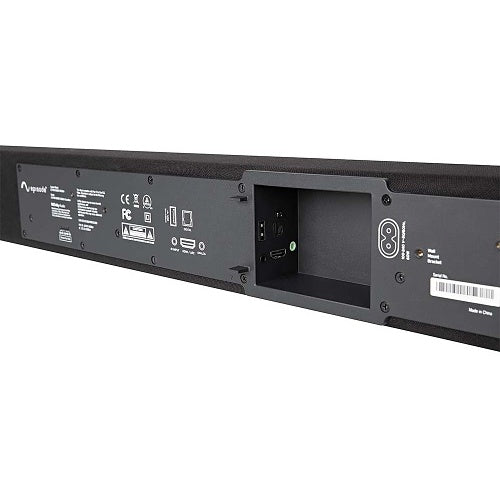
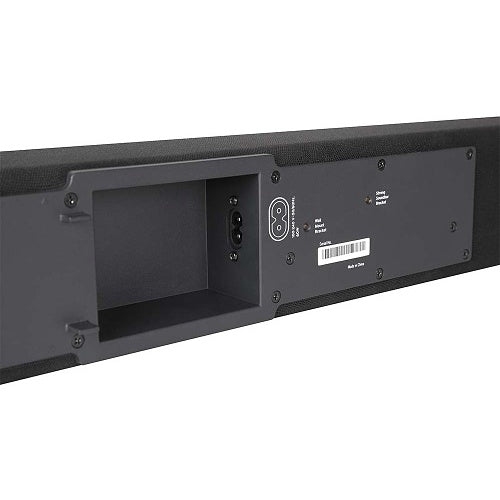
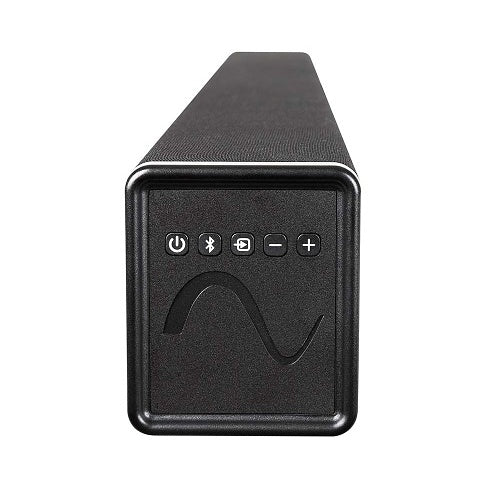
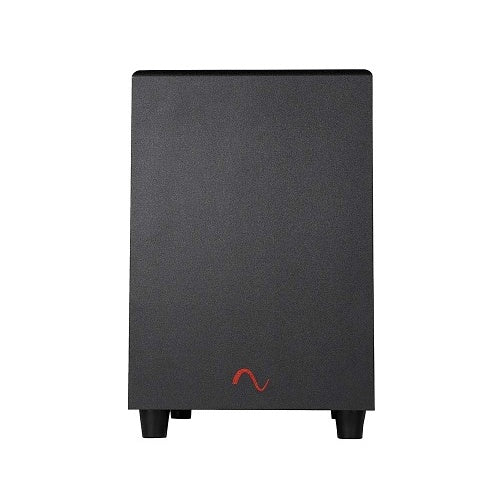
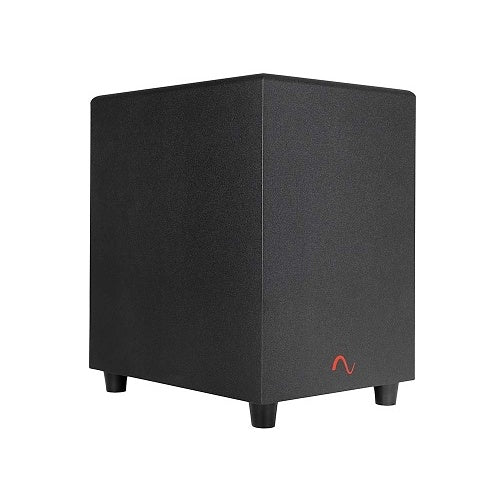
Episode ES-PWR-SNDBR-180-BLK 2.1 Soundbar 8" Wireless Subwoofer
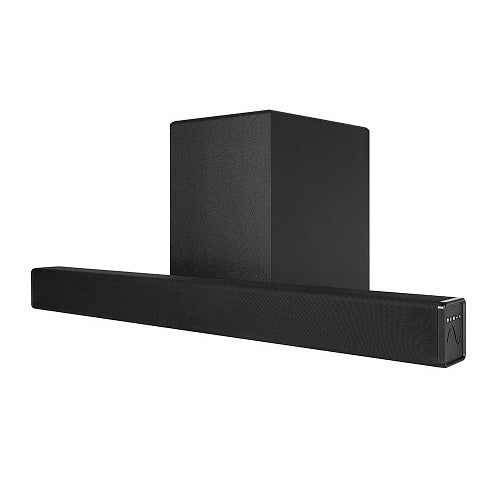
Complete 2.1 TV audio system with a 37.8-inch active soundbar and factory-paired 8-inch wireless subwoofer. Connect through HDMI ARC, optical, stereo RCA, Bluetooth, or USB music playback. Includes a remote, wall-mount brackets, adjustable subwoofer level, five EQ modes, IR integration, 35Hz–20kHz response, and 320W peak output. Both components require AC power.
Tax excluded. Shipping calculated at checkout
Free U.S. shipping is available on orders over $499.99.
Personalized pricing may be available for a single item, multiple products, larger quantities, or competitive quotes.
Before You Buy
Check compatibility, what’s included, key specifications, and installation requirements in the Product Details below. Need help confirming compatibility? Contact us before ordering.
Shipping Information
A tracking number is provided by email after the order has shipped. U.S. only: Orders usually process in 1 to 2 business days, with delivery typically taking 3 to 6 business days after shipment. Free shipping on orders over $499.99 For more information, please see our Shipping Policy here.
30 Day Returns & Warranty
We accept returns within 30 days of delivery for unused, uninstalled items in original packaging. Many products also include a manufacturer warranty. For more information, please see our Refund Policy here.
Official Product Resources
ES-PWR-SNDBR-180-BLK Product Manual & Specs
View the official ES-PWR-SNDBR-180-BLK manual for product specifications, setup details, wiring guidance, and installation reference before ordering.
Open ES-PWR-SNDBR-180-BLK Manual PDFOpens the official PDF manual in a new tab, where you can view, save, or print the file from your browser.
Episode ES-PWR-SNDBR-180-BLK 2.1 Soundbar 8" Wireless Subwoofer
Product Details
Better TV Sound Without a Separate Receiver
The Episode ES-PWR-SNDBR-180-BLK is a complete 2.1-channel active soundbar system designed to improve television dialogue, music, movies, sports, and gaming without requiring a separate AV receiver or multiple speaker cabinets.
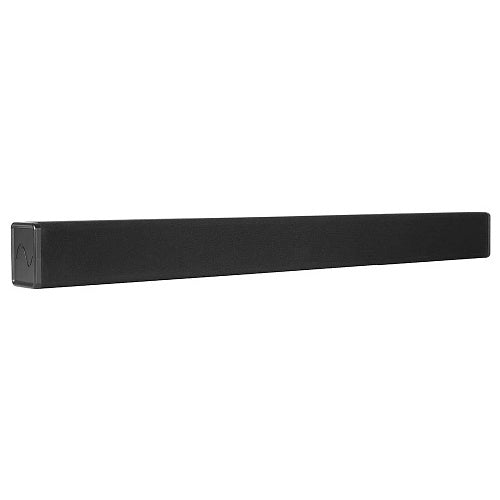
The system includes a 37.8-inch powered soundbar and a factory-paired 8-inch wireless subwoofer. The soundbar connects directly to a compatible television through HDMI ARC, optical, or stereo RCA, while Bluetooth and USB music playback provide additional listening options.
The subwoofer receives audio wirelessly, but both the soundbar and subwoofer must be connected to AC power.
Best Use Cases
- Living-room televisions: Improve dialogue, music, and bass without installing a full surround-sound system.
- Bedrooms and secondary TVs: Add fuller sound while keeping setup and daily operation simple.
- Media rooms: Upgrade movies, streaming, sports, and gaming with a dedicated wireless subwoofer.
- Wall-mounted televisions: Install the soundbar beneath the screen using the included wall brackets or a compatible optional TV-mount bracket.
- Cabinet and shelf installations: Place the soundbar directly beneath the television on a suitable cabinet or media shelf.
- Bluetooth music: Stream audio from a compatible phone, tablet, or computer without turning on the television.
- Integrated AV systems: Use IR learning, the rear 3.5mm IR input, and published IR commands with compatible control equipment.
Who Should Buy This?
This is a strong choice if you want a straightforward improvement over built-in TV speakers and prefer an included subwoofer without the complexity of a separate receiver, center speaker, surround speakers, and speaker wiring throughout the room.
It makes particular sense when HDMI ARC, optical audio, Bluetooth streaming, remote control, discreet wall mounting, and stronger bass are more important than advanced surround formats or expandable rear channels.
Who Should Not Buy This?
This is not a Dolby Atmos or multichannel surround-sound system. It is a 2.1-channel system with left and right soundbar channels plus a subwoofer.
It does not include a dedicated physical center speaker, rear-surround speakers, or height speakers. Its EQ processing can emphasize dialogue, but it does not create a separate center channel.
This is also not the right system when you need HDMI eARC, HDMI video passthrough, several HDMI source inputs, network streaming, app control, or expansion to wireless rear speakers. Episode publishes one HDMI ARC connection and does not list those additional capabilities.
The soundbar and subwoofer are indoor products. Do not install either component outdoors or expose them to dripping water, rain, or excessive humidity.
Complete Soundbar and Subwoofer System
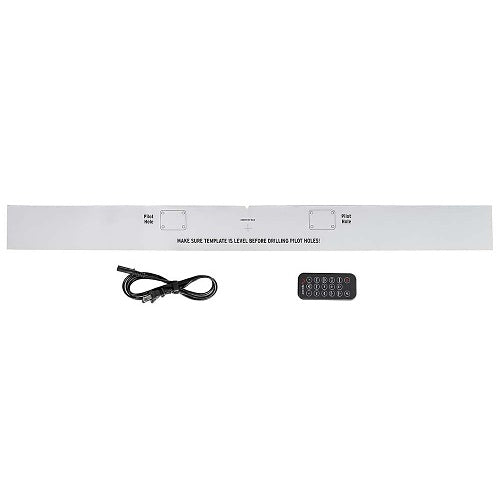
The package includes one active soundbar, one wireless subwoofer, one handheld remote, two power cords, two wall brackets, wall-bracket screws, Strong-mount screws, and the required installation hardware listed in Episode’s current manual.
Audio connection cables are not listed among the included contents in the current installation guide. Plan to supply the appropriate HDMI, optical, or RCA cable for the television or source device.
Four 3-Inch Soundbar Woofers
The soundbar uses four 3-inch coated-paper cone woofers to reproduce dialogue, vocals, music, and supporting midbass.
Distributing several drivers across the width of the soundbar helps create broader sound coverage than a television’s small built-in speakers.
Dual 3/4-Inch Soft-Dome Tweeters
Two 3/4-inch Teteron soft-dome tweeters reproduce speech detail, instruments, and higher frequencies.
Episode describes the system as being designed around low distortion, wide dispersion, and a balanced frequency response.
Included 8-Inch Wireless Subwoofer
The included subwoofer uses an 8-inch down-firing coated-paper cone driver to reproduce the deeper bass that the compact soundbar cannot produce by itself.
The subwoofer is factory-paired with the soundbar and normally connects automatically after both components are powered on.
The wireless connection carries audio only. The subwoofer must still be connected to a nearby AC outlet.
Published Wireless Range
Episode publishes a subwoofer placement range of up to approximately 30 feet from the soundbar.
Actual wireless performance can be affected by walls, furniture, metal structures, electronic interference, and the layout of the room. Place the subwoofer closer to the soundbar if pairing or playback becomes unreliable.
Subwoofer Placement
Subwoofer placement can significantly change the amount and character of the bass.
Placing the subwoofer near a wall or corner may increase perceived output, but it can also make bass sound excessive or uneven. Test several available locations and evaluate the result from the main seating position.
Do not block the down-firing driver or place the subwoofer on an unstable surface.
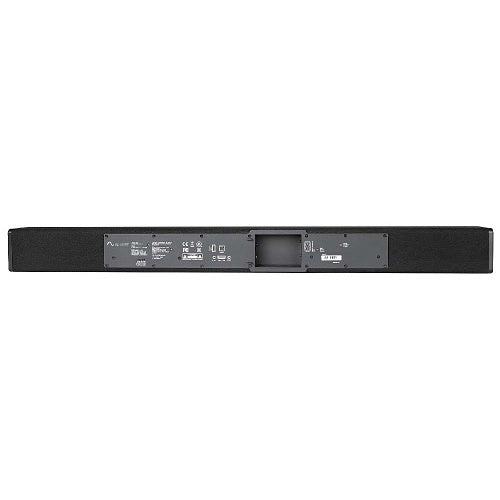
HDMI ARC Connection
HDMI ARC is generally the preferred connection for a compatible television because one HDMI cable can carry audio from the TV to the soundbar.
Supported televisions can also pass volume and mute commands through the ARC connection, simplifying daily use.
The television’s HDMI port must specifically support ARC. This model is documented with HDMI ARC, not HDMI eARC.
The soundbar does not publish additional HDMI source inputs or video passthrough. Connect streaming devices, game consoles, and disc players to the television, then send TV audio back through ARC.
Optical Digital Audio
The Toslink optical input provides a reliable alternative for televisions that do not support HDMI ARC or when ARC control is not required.
When using optical audio, the supplied Episode remote, IR learning, or another compatible control method may be required for volume adjustment.
Stereo RCA Analog Input
The left and right RCA input accepts analog stereo audio from compatible televisions, media players, preamplifiers, and other source equipment.
Confirm that the source provides a compatible analog audio output. The RCA connection is an input, not a subwoofer output.
Bluetooth Music Streaming
Built-in Bluetooth allows music and other audio to be streamed from a compatible phone, tablet, or computer.
The soundbar remembers previously paired devices and attempts to reconnect when Bluetooth is selected again.
Bluetooth is intended for direct audio streaming. The system does not publish Wi-Fi, Ethernet, app control, AirPlay, Chromecast, or other network-streaming support.
USB Music Playback
The rear USB connection supports music playback from a compatible USB storage drive.
The official manual lists support for compatible MP3, WAV, and FLAC music files. Playback begins when a supported drive is inserted, and track controls are available from the remote.
The USB connection should not be described as a general TV audio input. It is intended for compatible music-file playback from USB storage.
Five Listening Modes
The supplied remote provides five selectable EQ modes:
- Flat: A neutral starting mode for general listening.
- Music: A selectable profile for music playback.
- Movie: A selectable profile for movies and television.
- Night: A listening option intended for lower-volume use.
- Wide: A selectable profile intended to broaden the perceived presentation.
Episode also describes its EQ processing as helping emphasize dialogue and create a presentation similar to a three-channel front stage using the system’s two soundbar channels.
This processing does not turn the soundbar into a physical three-channel speaker or Dolby Atmos system.
Adjustable Subwoofer Level
Dedicated Sub + and Sub – controls on the remote allow the bass level to be adjusted separately from the overall system volume.
Play familiar music or a movie scene at a normal listening level and adjust the subwoofer until bass sounds balanced from the main seating position.
Avoid setting the subwoofer level so high that bass becomes boomy, localized, or distracting from dialogue.
Included Remote Control
The included IR remote controls power, mute, source selection, volume, subwoofer level, Bluetooth pairing, EQ mode, and compatible USB playback functions.
A short press of the power button places the soundbar in standby. A long press activates Deep Sleep mode, in which the unit must be turned on again using the power button.
Audio Sense and Automatic Standby
Episode’s Audio Sense feature allows the soundbar to turn on when an audio signal is detected.
The soundbar enters standby after approximately 15 minutes without a detected signal.
Source equipment, output level, and connection type can affect how reliably signal sensing operates.
TV and Universal Remote Control
With a compatible HDMI ARC television, volume and mute may be controlled through the television’s normal remote.
The soundbar also includes an IR-learning function. The current manual states that learning is limited to volume up, volume down, and mute commands.
For fuller third-party control, Episode publishes IR commands and includes a rear 3.5mm IR input for compatible IR-repeaters and automation systems.
Wall, Shelf, or TV-Mount Installation
The soundbar can be positioned on a media cabinet, placed on a suitable shelf, or installed beneath a wall-mounted television using the included brackets.
For shelf placement, keep the front edge of the soundbar aligned with the front edge of the shelf. Recessing it deep inside a cabinet can reduce sound quality.
Episode recommends positioning the soundbar as close to the television as practical. Its manual warns that installing it more than approximately 3 inches from the screen may reduce the connection between the picture and sound.
The soundbar is also compatible with the optional Strong SM-SBAR-BKT, which allows it to move with a television installed on an articulating mount.
Mounting Hardware Considerations
Included brackets and screws support standard installation, but the installer must confirm that the selected fasteners are appropriate for the wall construction and the soundbar’s weight.
Use wall studs whenever possible. When studs are unavailable, use correctly rated anchors suitable for the wall material.
Confirm the TV position, soundbar width, mounting height, electrical outlets, HDMI or optical cable route, and bracket clearance before drilling.
Power Requirements
- Soundbar input power: 100–240V AC, 50/60Hz.
- Soundbar published power consumption: 100W.
- Subwoofer input power: 100–240V AC, 50/60Hz.
- Subwoofer published power consumption: 90W.
- Power cords: One for the soundbar and one for the subwoofer.
The soundbar and subwoofer must each be connected to power. Use compatible surge protection or power management for the television, soundbar, subwoofer, streaming devices, and related AV equipment.
Power and Output Ratings
Episode describes the system as using a 100W active soundbar and an 80W built-in subwoofer amplifier. The official specification table separately lists 320W peak system output.
The manufacturer does not publish a complete per-channel RMS output breakdown in the current specification table. Avoid describing the system as 320W RMS or adding the ratings together as though they use the same measurement method.
Technical Specifications
- Product type: Powered 2.1-channel soundbar system.
- Model: ES-PWR-SNDBR-180-BLK.
- Color: Black.
- Soundbar woofers: Four 3-inch coated-paper cone drivers.
- Soundbar tweeters: Two 3/4-inch Teteron soft-dome drivers.
- Subwoofer: One 8-inch down-firing coated-paper cone driver.
- Published frequency response: 35Hz to 20kHz.
- Published peak output: 320W.
- Audio connections: HDMI ARC, optical, stereo RCA, USB, and Bluetooth.
- IR integration: Front IR receiver, IR learning, published commands, and one rear 3.5mm IR input.
- Audio sensing: Automatic signal detection with approximately 15-minute standby.
- Grille: Black cloth.
- System format: Fixed 2.1 channels.
- Warranty: Two-year manufacturer warranty, subject to current warranty terms.
Dimensions and Weight
- Soundbar dimensions with feet: Approximately 37.8 inches wide, 3.7 inches high, and 3.5 inches deep.
- Soundbar dimensions with wall brackets: Approximately 37.8 inches wide, 3.5 inches high, and 3.5 inches deep.
- Soundbar weight: Approximately 9.22 lb.
- Subwoofer dimensions: Approximately 15.6 inches wide, 10.2 inches high, and 13.8 inches deep.
- Subwoofer weight: Approximately 16.27 lb.
When to Choose a Different Soundbar
Choose a Dolby Atmos soundbar when overhead effects and immersive object-based audio are priorities.
Choose an expandable soundbar system when you plan to add wireless rear-surround speakers later.
Choose a passive three-channel soundbar with an AV receiver when you need separate left, center, and right channels, advanced surround processing, several HDMI inputs, or higher system flexibility.
Choose a smaller all-in-one soundbar when there is no suitable location or electrical outlet for a separate subwoofer.
Good Products to Pair With This System
- Soundbars to compare additional active and passive TV-audio options.
- Episode Products for matching audio and home-entertainment equipment.
- TV Wall Mounts for fixed, tilting, and articulating television installations.
- HDMI Cables for connecting a compatible television through HDMI ARC.
- AV Receivers & Surround Sound when a full multichannel system is a better fit.
- Power Management Solutions to protect the television, soundbar, subwoofer, and connected source devices.
Need Help Confirming TV Compatibility?
Send us the TV model, screen size, available audio outputs, mounting type, and preferred control method. We can help confirm whether HDMI ARC, optical, or analog audio is the best connection and whether the soundbar will fit beneath the television.
Key Features
Powerful 2.1 Sound System – 100W soundbar + 80W wireless subwoofer
8” Wireless Subwoofer – Pre-paired for hassle-free setup
Multiple Connectivity Options – HDMI ARC, optical, analog, Bluetooth, USB
Built-in Bluetooth – Stream music wirelessly from your phone or tablet
Sleek, Modern Design – Matches contemporary TV setups
Easy Installation – Compatible with Strong soundbar mounts
IR Remote Control – Adjust settings with ease
Seamless Integration – IR codes and 3.5mm input for home automation systems
Designed with NRC Scientific Principles – Optimized for superior acoustics
2-Year Limited Warranty – Quality you can trust
FAQ
What is included with the Episode ES-PWR-SNDBR-180-BLK?
The system includes one active soundbar, one 8-inch wireless subwoofer, one remote, two power cords, wall-mount brackets, and the mounting screws listed in Episode’s current manual.
Are HDMI, optical, or RCA cables included?
The current installation guide does not list audio connection cables among the included contents. Plan to supply the appropriate cable for your television or source.
Is this a powered soundbar?
Yes. The soundbar contains its own amplification and connects directly to a compatible television or audio source.
Does the subwoofer have its own amplifier?
Yes. The included subwoofer is powered and contains its own built-in amplifier.
Is the subwoofer completely wireless?
No. Audio is transmitted wirelessly from the soundbar, but the subwoofer still requires an AC power connection.
Does the soundbar also require AC power?
Yes. Both the soundbar and subwoofer require separate power connections.
Does the subwoofer arrive paired?
Yes. It is factory-paired and normally connects automatically after both components are powered on.
How do I pair the subwoofer manually?
If automatic pairing fails, Episode instructs users to press the subwoofer pairing button twice. The status light flashes during pairing and turns solid blue after connection.
How far can the subwoofer be placed from the soundbar?
Episode publishes a range of up to approximately 30 feet. Walls, furniture, interference, and room construction may reduce the practical range.
Can the subwoofer be used with another soundbar?
Episode documents it as the dedicated wireless subwoofer for this complete system. It is not published as a universal standalone wireless subwoofer.
Can I connect a different subwoofer to the soundbar?
No separate wired subwoofer output is published. The system is designed to operate with its included factory-paired subwoofer.
How many audio channels does the system have?
It is a 2.1-channel system: left and right soundbar channels plus the wireless subwoofer.
Does it have a dedicated center speaker?
No. The soundbar uses two primary channels. Its EQ processing can emphasize dialogue, but it does not contain a separate center channel.
Does it support Dolby Atmos?
Episode does not publish Dolby Atmos support for this model. It is a conventional 2.1-channel soundbar system.
Does it support DTS?
The current official specifications do not publish DTS decoding support.
Does it support HDMI eARC?
No HDMI eARC support is published. The official connection is HDMI ARC.
Does it have HDMI video passthrough?
No additional HDMI source input or video-passthrough connection is published. Connect source devices to the TV and return audio through HDMI ARC, optical, or analog output.
Can I add wireless rear speakers?
No rear-speaker expansion capability is published for this fixed 2.1 system.
What is the best way to connect it to a TV?
HDMI ARC is usually the most convenient supported connection because it can carry TV audio and allow compatible TV volume and mute control through one cable.
What should I use if my TV does not support HDMI ARC?
Use the optical input or the stereo RCA input if the television provides a compatible output.
Can I use my television remote?
Supported HDMI ARC televisions can pass volume and mute commands. The soundbar also supports limited IR learning for volume up, volume down, and mute.
Can it learn every command from another remote?
No. Episode states that IR learning is limited to volume up, volume down, and mute.
Can it be integrated with a control system?
Yes. It has a rear 3.5mm IR input, a front IR receiver, and published IR commands for compatible control systems.
Does it include Bluetooth?
Yes. Bluetooth allows compatible phones, tablets, and computers to stream audio directly to the soundbar.
Does it have Wi-Fi or an app?
No Wi-Fi, Ethernet, streaming-platform integration, or mobile app is published for this model.
What is the USB port used for?
It plays compatible music files from a USB storage drive.
Which USB audio formats are supported?
The official manual lists compatible MP3, WAV, and FLAC files.
Can the USB connection carry TV audio?
It is documented for music playback from USB storage, not as a general USB television-audio connection.
What listening modes are included?
The remote provides Flat, Music, Movie, Night, and Wide EQ modes.
Can the subwoofer volume be adjusted separately?
Yes. Dedicated Sub + and Sub – buttons adjust the subwoofer level independently of the main system volume.
Does it turn on automatically?
Yes. Audio Sense allows it to turn on when a signal is detected.
When does it enter standby?
The soundbar enters standby after approximately 15 minutes without a detected audio signal.
What is Deep Sleep mode?
A long press of the remote’s power button activates Deep Sleep. In this mode, the soundbar must be turned on again using the power button rather than Audio Sense.
Can the soundbar be wall-mounted?
Yes. Wall-mount brackets are included.
Can it attach to an articulating TV mount?
Yes. It is compatible with the optional Strong SM-SBAR-BKT, allowing the soundbar to move with a compatible articulating television mount.
Can it sit on a shelf?
Yes. Position the front of the soundbar close to the front edge of the shelf rather than recessing it deep inside a cabinet.
How close should it be to the television?
Episode recommends placing it as close to the television as practical and warns against positioning it more than approximately 3 inches from the screen.
What is the published frequency response?
The complete system’s published frequency response is 35Hz to 20kHz.
What is the published output?
The official specification lists 320W peak output. Episode also describes a 100W active soundbar and an 80W powered subwoofer, but it does not publish a complete RMS channel breakdown.
Is the system 320W RMS?
No. The published 320W figure is a peak-output rating and should not be presented as 320W RMS.
What drivers are inside the soundbar?
The soundbar uses four 3-inch coated-paper cone woofers and two 3/4-inch Teteron soft-dome tweeters.
What size is the subwoofer?
It uses an 8-inch down-firing coated-paper cone driver.
How wide is the soundbar?
The current specification and manual list a width of approximately 37.8 inches.
What are the soundbar dimensions?
With its feet installed, it measures approximately 37.8 inches wide, 3.7 inches high, and 3.5 inches deep.
What are the subwoofer dimensions?
It measures approximately 15.6 inches wide, 10.2 inches high, and 13.8 inches deep.
How much does the soundbar weigh?
The soundbar weighs approximately 9.22 lb.
How much does the subwoofer weigh?
The subwoofer weighs approximately 16.27 lb.
Can the system be installed outdoors?
No. The soundbar and subwoofer are designed for dry indoor use.
What is the warranty?
Episode publishes a two-year manufacturer warranty, subject to its current warranty terms.
What should I check before ordering?
Check the television’s audio outputs, HDMI ARC support, available space beneath the screen, wall or shelf mounting method, nearby power outlets, subwoofer placement, cable requirements, and whether a fixed 2.1 system meets your audio goals.
Better TV Sound Without a Separate Receiver
The Episode ES-PWR-SNDBR-180-BLK is a complete 2.1-channel active soundbar system designed to improve television dialogue, music, movies, sports, and gaming without requiring a separate AV receiver or multiple speaker cabinets.
The system includes a 37.8-inch powered soundbar and a factory-paired 8-inch wireless subwoofer. The soundbar connects directly to a compatible television through HDMI ARC, optical, or stereo RCA, while Bluetooth and USB music playback provide additional listening options.
The subwoofer receives audio wirelessly, but both the soundbar and subwoofer must be connected to AC power.
Best Use Cases
- Living-room televisions: Improve dialogue, music, and bass without installing a full surround-sound system.
- Bedrooms and secondary TVs: Add fuller sound while keeping setup and daily operation simple.
- Media rooms: Upgrade movies, streaming, sports, and gaming with a dedicated wireless subwoofer.
- Wall-mounted televisions: Install the soundbar beneath the screen using the included wall brackets or a compatible optional TV-mount bracket.
- Cabinet and shelf installations: Place the soundbar directly beneath the television on a suitable cabinet or media shelf.
- Bluetooth music: Stream audio from a compatible phone, tablet, or computer without turning on the television.
- Integrated AV systems: Use IR learning, the rear 3.5mm IR input, and published IR commands with compatible control equipment.
Who Should Buy This?
This is a strong choice if you want a straightforward improvement over built-in TV speakers and prefer an included subwoofer without the complexity of a separate receiver, center speaker, surround speakers, and speaker wiring throughout the room.
It makes particular sense when HDMI ARC, optical audio, Bluetooth streaming, remote control, discreet wall mounting, and stronger bass are more important than advanced surround formats or expandable rear channels.
Who Should Not Buy This?
This is not a Dolby Atmos or multichannel surround-sound system. It is a 2.1-channel system with left and right soundbar channels plus a subwoofer.
It does not include a dedicated physical center speaker, rear-surround speakers, or height speakers. Its EQ processing can emphasize dialogue, but it does not create a separate center channel.
This is also not the right system when you need HDMI eARC, HDMI video passthrough, several HDMI source inputs, network streaming, app control, or expansion to wireless rear speakers. Episode publishes one HDMI ARC connection and does not list those additional capabilities.
The soundbar and subwoofer are indoor products. Do not install either component outdoors or expose them to dripping water, rain, or excessive humidity.
Complete Soundbar and Subwoofer System
The package includes one active soundbar, one wireless subwoofer, one handheld remote, two power cords, two wall brackets, wall-bracket screws, Strong-mount screws, and the required installation hardware listed in Episode’s current manual.
Audio connection cables are not listed among the included contents in the current installation guide. Plan to supply the appropriate HDMI, optical, or RCA cable for the television or source device.
Four 3-Inch Soundbar Woofers
The soundbar uses four 3-inch coated-paper cone woofers to reproduce dialogue, vocals, music, and supporting midbass.
Distributing several drivers across the width of the soundbar helps create broader sound coverage than a television’s small built-in speakers.
Dual 3/4-Inch Soft-Dome Tweeters
Two 3/4-inch Teteron soft-dome tweeters reproduce speech detail, instruments, and higher frequencies.
Episode describes the system as being designed around low distortion, wide dispersion, and a balanced frequency response.
Included 8-Inch Wireless Subwoofer
The included subwoofer uses an 8-inch down-firing coated-paper cone driver to reproduce the deeper bass that the compact soundbar cannot produce by itself.
The subwoofer is factory-paired with the soundbar and normally connects automatically after both components are powered on.
The wireless connection carries audio only. The subwoofer must still be connected to a nearby AC outlet.
Published Wireless Range
Episode publishes a subwoofer placement range of up to approximately 30 feet from the soundbar.
Actual wireless performance can be affected by walls, furniture, metal structures, electronic interference, and the layout of the room. Place the subwoofer closer to the soundbar if pairing or playback becomes unreliable.
Subwoofer Placement
Subwoofer placement can significantly change the amount and character of the bass.
Placing the subwoofer near a wall or corner may increase perceived output, but it can also make bass sound excessive or uneven. Test several available locations and evaluate the result from the main seating position.
Do not block the down-firing driver or place the subwoofer on an unstable surface.
HDMI ARC Connection
HDMI ARC is generally the preferred connection for a compatible television because one HDMI cable can carry audio from the TV to the soundbar.
Supported televisions can also pass volume and mute commands through the ARC connection, simplifying daily use.
The television’s HDMI port must specifically support ARC. This model is documented with HDMI ARC, not HDMI eARC.
The soundbar does not publish additional HDMI source inputs or video passthrough. Connect streaming devices, game consoles, and disc players to the television, then send TV audio back through ARC.
Optical Digital Audio
The Toslink optical input provides a reliable alternative for televisions that do not support HDMI ARC or when ARC control is not required.
When using optical audio, the supplied Episode remote, IR learning, or another compatible control method may be required for volume adjustment.
Stereo RCA Analog Input
The left and right RCA input accepts analog stereo audio from compatible televisions, media players, preamplifiers, and other source equipment.
Confirm that the source provides a compatible analog audio output. The RCA connection is an input, not a subwoofer output.
Bluetooth Music Streaming
Built-in Bluetooth allows music and other audio to be streamed from a compatible phone, tablet, or computer.
The soundbar remembers previously paired devices and attempts to reconnect when Bluetooth is selected again.
Bluetooth is intended for direct audio streaming. The system does not publish Wi-Fi, Ethernet, app control, AirPlay, Chromecast, or other network-streaming support.
USB Music Playback
The rear USB connection supports music playback from a compatible USB storage drive.
The official manual lists support for compatible MP3, WAV, and FLAC music files. Playback begins when a supported drive is inserted, and track controls are available from the remote.
The USB connection should not be described as a general TV audio input. It is intended for compatible music-file playback from USB storage.
Five Listening Modes
The supplied remote provides five selectable EQ modes:
- Flat: A neutral starting mode for general listening.
- Music: A selectable profile for music playback.
- Movie: A selectable profile for movies and television.
- Night: A listening option intended for lower-volume use.
- Wide: A selectable profile intended to broaden the perceived presentation.
Episode also describes its EQ processing as helping emphasize dialogue and create a presentation similar to a three-channel front stage using the system’s two soundbar channels.
This processing does not turn the soundbar into a physical three-channel speaker or Dolby Atmos system.
Adjustable Subwoofer Level
Dedicated Sub + and Sub – controls on the remote allow the bass level to be adjusted separately from the overall system volume.
Play familiar music or a movie scene at a normal listening level and adjust the subwoofer until bass sounds balanced from the main seating position.
Avoid setting the subwoofer level so high that bass becomes boomy, localized, or distracting from dialogue.
Included Remote Control
The included IR remote controls power, mute, source selection, volume, subwoofer level, Bluetooth pairing, EQ mode, and compatible USB playback functions.
A short press of the power button places the soundbar in standby. A long press activates Deep Sleep mode, in which the unit must be turned on again using the power button.
Audio Sense and Automatic Standby
Episode’s Audio Sense feature allows the soundbar to turn on when an audio signal is detected.
The soundbar enters standby after approximately 15 minutes without a detected signal.
Source equipment, output level, and connection type can affect how reliably signal sensing operates.
TV and Universal Remote Control
With a compatible HDMI ARC television, volume and mute may be controlled through the television’s normal remote.
The soundbar also includes an IR-learning function. The current manual states that learning is limited to volume up, volume down, and mute commands.
For fuller third-party control, Episode publishes IR commands and includes a rear 3.5mm IR input for compatible IR-repeaters and automation systems.
Wall, Shelf, or TV-Mount Installation
The soundbar can be positioned on a media cabinet, placed on a suitable shelf, or installed beneath a wall-mounted television using the included brackets.
For shelf placement, keep the front edge of the soundbar aligned with the front edge of the shelf. Recessing it deep inside a cabinet can reduce sound quality.
Episode recommends positioning the soundbar as close to the television as practical. Its manual warns that installing it more than approximately 3 inches from the screen may reduce the connection between the picture and sound.
The soundbar is also compatible with the optional Strong SM-SBAR-BKT, which allows it to move with a television installed on an articulating mount.
Mounting Hardware Considerations
Included brackets and screws support standard installation, but the installer must confirm that the selected fasteners are appropriate for the wall construction and the soundbar’s weight.
Use wall studs whenever possible. When studs are unavailable, use correctly rated anchors suitable for the wall material.
Confirm the TV position, soundbar width, mounting height, electrical outlets, HDMI or optical cable route, and bracket clearance before drilling.
Power Requirements
- Soundbar input power: 100–240V AC, 50/60Hz.
- Soundbar published power consumption: 100W.
- Subwoofer input power: 100–240V AC, 50/60Hz.
- Subwoofer published power consumption: 90W.
- Power cords: One for the soundbar and one for the subwoofer.
The soundbar and subwoofer must each be connected to power. Use compatible surge protection or power management for the television, soundbar, subwoofer, streaming devices, and related AV equipment.
Power and Output Ratings
Episode describes the system as using a 100W active soundbar and an 80W built-in subwoofer amplifier. The official specification table separately lists 320W peak system output.
The manufacturer does not publish a complete per-channel RMS output breakdown in the current specification table. Avoid describing the system as 320W RMS or adding the ratings together as though they use the same measurement method.
Technical Specifications
- Product type: Powered 2.1-channel soundbar system.
- Model: ES-PWR-SNDBR-180-BLK.
- Color: Black.
- Soundbar woofers: Four 3-inch coated-paper cone drivers.
- Soundbar tweeters: Two 3/4-inch Teteron soft-dome drivers.
- Subwoofer: One 8-inch down-firing coated-paper cone driver.
- Published frequency response: 35Hz to 20kHz.
- Published peak output: 320W.
- Audio connections: HDMI ARC, optical, stereo RCA, USB, and Bluetooth.
- IR integration: Front IR receiver, IR learning, published commands, and one rear 3.5mm IR input.
- Audio sensing: Automatic signal detection with approximately 15-minute standby.
- Grille: Black cloth.
- System format: Fixed 2.1 channels.
- Warranty: Two-year manufacturer warranty, subject to current warranty terms.
Dimensions and Weight
- Soundbar dimensions with feet: Approximately 37.8 inches wide, 3.7 inches high, and 3.5 inches deep.
- Soundbar dimensions with wall brackets: Approximately 37.8 inches wide, 3.5 inches high, and 3.5 inches deep.
- Soundbar weight: Approximately 9.22 lb.
- Subwoofer dimensions: Approximately 15.6 inches wide, 10.2 inches high, and 13.8 inches deep.
- Subwoofer weight: Approximately 16.27 lb.
When to Choose a Different Soundbar
Choose a Dolby Atmos soundbar when overhead effects and immersive object-based audio are priorities.
Choose an expandable soundbar system when you plan to add wireless rear-surround speakers later.
Choose a passive three-channel soundbar with an AV receiver when you need separate left, center, and right channels, advanced surround processing, several HDMI inputs, or higher system flexibility.
Choose a smaller all-in-one soundbar when there is no suitable location or electrical outlet for a separate subwoofer.
Good Products to Pair With This System
- Soundbars to compare additional active and passive TV-audio options.
- Episode Products for matching audio and home-entertainment equipment.
- TV Wall Mounts for fixed, tilting, and articulating television installations.
- HDMI Cables for connecting a compatible television through HDMI ARC.
- AV Receivers & Surround Sound when a full multichannel system is a better fit.
- Power Management Solutions to protect the television, soundbar, subwoofer, and connected source devices.
Need Help Confirming TV Compatibility?
Send us the TV model, screen size, available audio outputs, mounting type, and preferred control method. We can help confirm whether HDMI ARC, optical, or analog audio is the best connection and whether the soundbar will fit beneath the television.
Powerful 2.1 Sound System – 100W soundbar + 80W wireless subwoofer
8” Wireless Subwoofer – Pre-paired for hassle-free setup
Multiple Connectivity Options – HDMI ARC, optical, analog, Bluetooth, USB
Built-in Bluetooth – Stream music wirelessly from your phone or tablet
Sleek, Modern Design – Matches contemporary TV setups
Easy Installation – Compatible with Strong soundbar mounts
IR Remote Control – Adjust settings with ease
Seamless Integration – IR codes and 3.5mm input for home automation systems
Designed with NRC Scientific Principles – Optimized for superior acoustics
2-Year Limited Warranty – Quality you can trust
What is included with the Episode ES-PWR-SNDBR-180-BLK?
The system includes one active soundbar, one 8-inch wireless subwoofer, one remote, two power cords, wall-mount brackets, and the mounting screws listed in Episode’s current manual.
Are HDMI, optical, or RCA cables included?
The current installation guide does not list audio connection cables among the included contents. Plan to supply the appropriate cable for your television or source.
Is this a powered soundbar?
Yes. The soundbar contains its own amplification and connects directly to a compatible television or audio source.
Does the subwoofer have its own amplifier?
Yes. The included subwoofer is powered and contains its own built-in amplifier.
Is the subwoofer completely wireless?
No. Audio is transmitted wirelessly from the soundbar, but the subwoofer still requires an AC power connection.
Does the soundbar also require AC power?
Yes. Both the soundbar and subwoofer require separate power connections.
Does the subwoofer arrive paired?
Yes. It is factory-paired and normally connects automatically after both components are powered on.
How do I pair the subwoofer manually?
If automatic pairing fails, Episode instructs users to press the subwoofer pairing button twice. The status light flashes during pairing and turns solid blue after connection.
How far can the subwoofer be placed from the soundbar?
Episode publishes a range of up to approximately 30 feet. Walls, furniture, interference, and room construction may reduce the practical range.
Can the subwoofer be used with another soundbar?
Episode documents it as the dedicated wireless subwoofer for this complete system. It is not published as a universal standalone wireless subwoofer.
Can I connect a different subwoofer to the soundbar?
No separate wired subwoofer output is published. The system is designed to operate with its included factory-paired subwoofer.
How many audio channels does the system have?
It is a 2.1-channel system: left and right soundbar channels plus the wireless subwoofer.
Does it have a dedicated center speaker?
No. The soundbar uses two primary channels. Its EQ processing can emphasize dialogue, but it does not contain a separate center channel.
Does it support Dolby Atmos?
Episode does not publish Dolby Atmos support for this model. It is a conventional 2.1-channel soundbar system.
Does it support DTS?
The current official specifications do not publish DTS decoding support.
Does it support HDMI eARC?
No HDMI eARC support is published. The official connection is HDMI ARC.
Does it have HDMI video passthrough?
No additional HDMI source input or video-passthrough connection is published. Connect source devices to the TV and return audio through HDMI ARC, optical, or analog output.
Can I add wireless rear speakers?
No rear-speaker expansion capability is published for this fixed 2.1 system.
What is the best way to connect it to a TV?
HDMI ARC is usually the most convenient supported connection because it can carry TV audio and allow compatible TV volume and mute control through one cable.
What should I use if my TV does not support HDMI ARC?
Use the optical input or the stereo RCA input if the television provides a compatible output.
Can I use my television remote?
Supported HDMI ARC televisions can pass volume and mute commands. The soundbar also supports limited IR learning for volume up, volume down, and mute.
Can it learn every command from another remote?
No. Episode states that IR learning is limited to volume up, volume down, and mute.
Can it be integrated with a control system?
Yes. It has a rear 3.5mm IR input, a front IR receiver, and published IR commands for compatible control systems.
Does it include Bluetooth?
Yes. Bluetooth allows compatible phones, tablets, and computers to stream audio directly to the soundbar.
Does it have Wi-Fi or an app?
No Wi-Fi, Ethernet, streaming-platform integration, or mobile app is published for this model.
What is the USB port used for?
It plays compatible music files from a USB storage drive.
Which USB audio formats are supported?
The official manual lists compatible MP3, WAV, and FLAC files.
Can the USB connection carry TV audio?
It is documented for music playback from USB storage, not as a general USB television-audio connection.
What listening modes are included?
The remote provides Flat, Music, Movie, Night, and Wide EQ modes.
Can the subwoofer volume be adjusted separately?
Yes. Dedicated Sub + and Sub – buttons adjust the subwoofer level independently of the main system volume.
Does it turn on automatically?
Yes. Audio Sense allows it to turn on when a signal is detected.
When does it enter standby?
The soundbar enters standby after approximately 15 minutes without a detected audio signal.
What is Deep Sleep mode?
A long press of the remote’s power button activates Deep Sleep. In this mode, the soundbar must be turned on again using the power button rather than Audio Sense.
Can the soundbar be wall-mounted?
Yes. Wall-mount brackets are included.
Can it attach to an articulating TV mount?
Yes. It is compatible with the optional Strong SM-SBAR-BKT, allowing the soundbar to move with a compatible articulating television mount.
Can it sit on a shelf?
Yes. Position the front of the soundbar close to the front edge of the shelf rather than recessing it deep inside a cabinet.
How close should it be to the television?
Episode recommends placing it as close to the television as practical and warns against positioning it more than approximately 3 inches from the screen.
What is the published frequency response?
The complete system’s published frequency response is 35Hz to 20kHz.
What is the published output?
The official specification lists 320W peak output. Episode also describes a 100W active soundbar and an 80W powered subwoofer, but it does not publish a complete RMS channel breakdown.
Is the system 320W RMS?
No. The published 320W figure is a peak-output rating and should not be presented as 320W RMS.
What drivers are inside the soundbar?
The soundbar uses four 3-inch coated-paper cone woofers and two 3/4-inch Teteron soft-dome tweeters.
What size is the subwoofer?
It uses an 8-inch down-firing coated-paper cone driver.
How wide is the soundbar?
The current specification and manual list a width of approximately 37.8 inches.
What are the soundbar dimensions?
With its feet installed, it measures approximately 37.8 inches wide, 3.7 inches high, and 3.5 inches deep.
What are the subwoofer dimensions?
It measures approximately 15.6 inches wide, 10.2 inches high, and 13.8 inches deep.
How much does the soundbar weigh?
The soundbar weighs approximately 9.22 lb.
How much does the subwoofer weigh?
The subwoofer weighs approximately 16.27 lb.
Can the system be installed outdoors?
No. The soundbar and subwoofer are designed for dry indoor use.
What is the warranty?
Episode publishes a two-year manufacturer warranty, subject to its current warranty terms.
What should I check before ordering?
Check the television’s audio outputs, HDMI ARC support, available space beneath the screen, wall or shelf mounting method, nearby power outlets, subwoofer placement, cable requirements, and whether a fixed 2.1 system meets your audio goals.
RELATED PRODUCTS
Discover Other Products You Might Like and Simplify Your Search
Why Customers Keep Coming Back
Real feedback from customers nationwide on our service, shipping, and support.

M. from New Jersey
Outstanding customer service speakers arrived cross country Cali to New Jersey in spectacular condition.
Great communication great packaging would buy again.

M. from Louisiana
Product arrived quickly and in good condition. The price was very competitive. I’m very satisfied. I highly recommend the seller.
G. from Texas
Place a large order and was able to accommodate me quickly and parts were delivered as promised
R. from California
Easy ordering and super fast standard shipping. Great experience and highly recommended.
B. from Texas
Arrived promptly & in excellent condition with all required parts. Sounds great and impedance matches other speakers.
E. from Arizona
Great products, easy ordering, prompt shipping
S. from Florida
Excellent customer service! Picks up the phone. Fast delivery across the country. Worthy online retailer!
G. from Texas
Bear Security Shop has a great customer service, and is fast and easy to do business with. I've ordered product from them twice with great service both times. Would definitely recommend them.
J. from Los Angeles
Excellent customer service. Lightning fast shipping. Very grateful for the team at Bear Security. Thank you!
T. from Oklahoma
Trustworthy, honest, and plus integrity, with outstanding professionalism! I highly recommend them buy with confidence!

C. from Colorado
Experience with Bear Security Shop was fast and easy and the speakers arrived less than we week after ordering. And the price was half what my installer wanted to charge me for these speakers. Highly recommended.
V. from California
Excellent communication. Prompt responses and very knowledgeable and helpful. Items arrived faster than expected and in brand new condition as described. Will continue to do business with them.
C. from South Dakota
Awesome camras well worth the money good seller would buy again 👍
Get Expert Picks and Real Setup Advice
Subscribe for practical tips, product recommendations, and occasional subscriber only deals. No spam.