


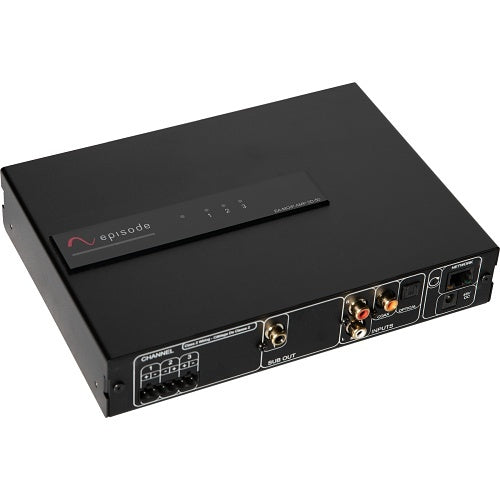
Episode EA-MOIP-AMP-3D-50 DSP 3-Ch Amplifier 50W MoIP Streaming
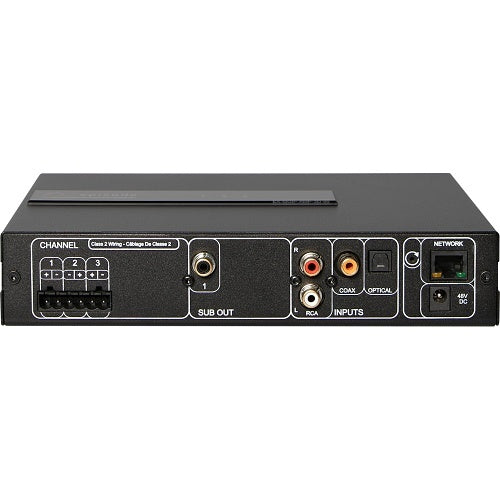
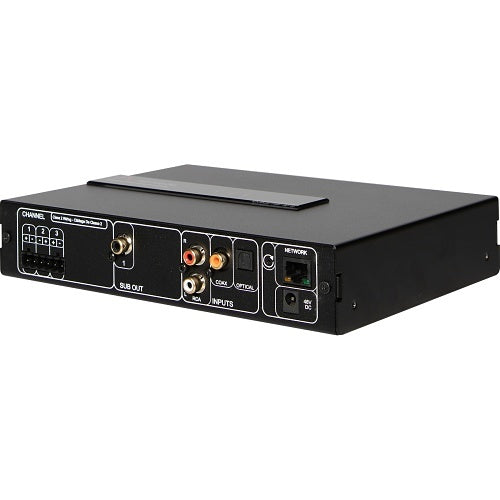
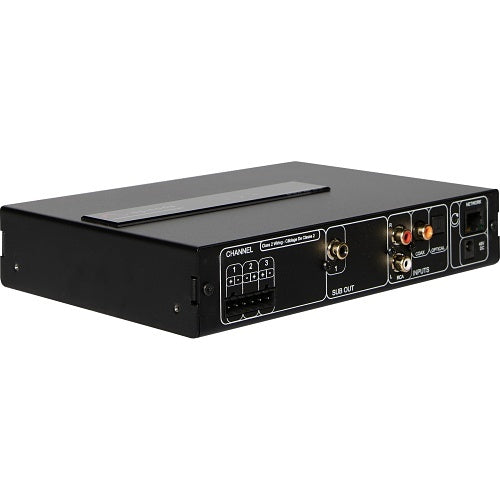
Compact three-channel MoIP DSP amplifier for one stereo, 2.1, 3.0, or 3.1 audio zone. Receives one MoIP network-audio stream, transmits a local RCA or digital source, and provides a dedicated powered-subwoofer output. Delivers up to 50W RMS into 4 ohms with one channel driven using PoE++ or optional 48V power; current specifications list 20W per channel with all three channels driven. Requires a B-900 MoIP controller and compatible managed network.
Tax excluded. Shipping calculated at checkout
Free U.S. shipping is available on orders over $499.99.
Personalized pricing may be available for a single item, multiple products, larger quantities, or competitive quotes.
Before You Buy
Check compatibility, what’s included, key specifications, and installation requirements in the Product Details below. Need help confirming compatibility? Contact us before ordering.
Shipping Information
A tracking number is provided by email after the order has shipped. U.S. only: Orders usually process in 1 to 2 business days, with delivery typically taking 3 to 6 business days after shipment. Free shipping on orders over $499.99 For more information, please see our Shipping Policy here.
30 Day Returns & Warranty
We accept returns within 30 days of delivery for unused, uninstalled items in original packaging. Many products also include a manufacturer warranty. For more information, please see our Refund Policy here.
Official Product Resources
EA-MOIP-AMP-3D-50 Product Manual & Specs
View the official EA-MOIP-AMP-3D-50 manual for product specifications, setup details, wiring guidance, and installation reference before ordering.
Open EA-MOIP-AMP-3D-50 Manual PDFOpens the official PDF manual in a new tab, where you can view, save, or print the file from your browser.
Episode EA-MOIP-AMP-3D-50 DSP 3-Ch Amplifier 50W MoIP Streaming
Product Details
Flexible MoIP Audio for One Room
The Episode EA-MOIP-AMP-3D-50 is a compact three-channel DSP amplifier designed to receive, route, decode, and amplify audio within a compatible Snap One Media over IP system.
It supports one configurable audio zone and can be used for stereo, 2.1, 3.0, 3.1, or mono playback depending on the speakers and subwoofer connected. A local stereo RCA or digital source can also be placed onto the MoIP network for playback by other compatible endpoints.
This is not an independent music-streaming amplifier. A working B-900-MOIP-4K-CTRL controller, compatible managed network, and appropriate MoIP sources or transmitters are required for MoIP operation.
Best Use Cases
- Stereo room audio: Use two amplified channels to power a conventional left-and-right speaker pair.
- 2.1 music or television system: Power two passive speakers and connect a powered subwoofer through the dedicated RCA Sub Out.
- 2.1 system with a passive subwoofer: Assign channels one and two to the main speakers and the third channel to a compatible passive subwoofer.
- 3.0 front soundstage: Power left, center, and right speakers for television, movie, or dialogue-focused playback.
- 3.1 front soundstage: Power left, center, and right speakers and connect a powered subwoofer to the RCA Sub Out.
- Audio near a remote television: Position amplification near the speakers while carrying the source audio across the MoIP network.
- Local-source distribution: Connect a nearby analog or digital audio source and transmit it to another compatible MoIP zone.
- DSP-managed architectural audio: Apply speaker presets, room EQ, crossover settings, distance, maximum volume, and subwoofer adjustment through OvrC.
Who Should Buy This?
This is a strong choice when the property already uses, or is being designed around, Snap One’s MoIP ecosystem and one room needs compact local amplification.
It is particularly useful for a bedroom, office, television room, den, or secondary media space where one source-controlled audio zone requires two or three amplified speakers and optional subwoofer support.
It also makes sense when a local television or music source needs to be introduced onto the MoIP network for playback elsewhere in the property.
Who Should Not Buy This?
This is not a conventional plug-and-play stereo amplifier. It requires network planning, compatible MoIP equipment, a B-900-MOIP-4K-CTRL controller, and configuration through OvrC.
It does not independently provide Spotify Connect, Apple AirPlay, Chromecast, Bluetooth music streaming, Internet radio, or built-in consumer music-service apps.
It is not a three-zone amplifier. The EA-MOIP-AMP-3D-50 supports a maximum of one configured audio zone.
It does not contain an HDMI input or output and does not physically process video. References to 4K HDR apply to the wider MoIP AV ecosystem.
It is not a 70V or 100V amplifier. Its three outputs are designed for compatible low-impedance passive speakers.
It should not be selected when three channels must each receive 50W continuously. The current manufacturer table lists 20W per channel with all three channels driven.
Sold Individually
The EA-MOIP-AMP-3D-50 is sold as one three-channel amplifier.
The box includes the amplifier, two mounting ears with screws, four removable feet, and an installation-manual QR card.
An AC power cable and 48V power supply are not included with this model because it is normally powered through PoE or the separately sold Episode 48V DC supply.
One Configurable Audio Zone
The three amplified output channels and single RCA Sub Out are assigned to one audio zone.
Common configurations include:
- 2.0: Left and right passive speakers.
- 2.1 with a powered subwoofer: Left and right passive speakers plus the RCA Sub Out.
- 2.1 with a passive subwoofer: Left and right passive speakers plus the third amplified channel assigned to a compatible passive subwoofer.
- 3.0: Left, center, and right passive speakers.
- 3.1: Left, center, and right passive speakers plus a powered subwoofer connected to the RCA Sub Out.
- Mono: One configured mono speaker output where appropriate.
The amplifier does not provide independent source and volume control for three separate rooms.
Important Power-Rating Explanation
Available amplifier output depends on the power source and the number of channels operating.
Episode publishes the following continuous one-channel-driven ratings:
- Standard PoE: Up to 15.5W RMS.
- PoE+: Up to 30W RMS.
- PoE++: Up to 50W RMS.
- Optional 48V DC supply: Up to 50W RMS.
Snap One’s current model-comparison table separately lists 20W per channel into 4 ohms with all three channels driven.
The amplifier should therefore be described as providing up to 50W with one channel driven, not as a simultaneous 3 × 50W amplifier.
PoE, PoE+, and PoE++ Power
The RJ45 network port can carry both network data and operating power from a compatible PoE switch or injector.
The connected PoE standard directly affects available one-channel amplifier output. A standard PoE port may power the amplifier but will not provide the output available through PoE++.
Before ordering, confirm:
- The switch or injector’s supported PoE standard.
- The wattage available from the selected port.
- The switch’s total PoE budget after every connected device is counted.
- The expected number of simultaneously active amplifier channels.
- The connected speaker load and desired listening level.
Optional 48V DC Power Supply
When suitable PoE power is unavailable, the amplifier can be powered by the separately sold Episode EE-PS-48VDC-2.5A supply.
The external supply connects to the rear 48V DC input and supports the published 50W one-channel-driven output.
The 48V power supply is not included with the amplifier.
Built-In MoIP Audio Receiver
The EA-MOIP-AMP-3D-50 can receive one audio stream from a compatible Snap One MoIP system.
The source may originate from a MoIP audio transmitter or from compatible audio associated with another source introduced into the wider MoIP ecosystem.
The MoIP system provides latency compensation to help keep audio synchronized with compatible network video zones.
Transmit a Local Source onto the MoIP Network
The amplifier can also operate as one MoIP audio transmitter.
A compatible source connected to the local stereo RCA input or digital input can be introduced onto the MoIP network and routed to another compatible endpoint.
The three-channel model supports one MoIP receive stream and one MoIP transmit stream.
Local Stereo RCA Input
One stereo RCA input accepts a compatible analog line-level source.
Possible sources include a television with analog audio output, music player, preamplifier, audio extractor, or another line-level device.
The official input specifications list 500mV sensitivity and 20,000-ohm input impedance.
Combo Coaxial and Optical Digital Input
One digital input supports either coaxial S/PDIF or optical Toslink.
The coaxial and optical connections operate in parallel, so only one can be used at a time.
The digital input can feed the local zone or act as the source transmitted onto the MoIP network.
Supported Audio Formats
The amplifier supports compatible Dolby Digital, DTS Surround, multichannel LPCM, and PCM audio formats.
It can receive and decode a multichannel source, but the final speaker layout must fit within its three amplified channels and one powered-subwoofer output.
Dolby Atmos, DTS:X, Dolby TrueHD, and DTS-HD Master Audio decoding are not published for this model and should not be claimed.
No Built-In Consumer Streaming Services
“MoIP streaming” refers to transporting compatible audio across a Media over IP network.
It does not mean the amplifier independently signs into Spotify, Apple Music, Amazon Music, Internet radio, or other consumer streaming platforms.
A compatible external source or casting device is required when those services are part of the system.
Dedicated Powered-Subwoofer Output
The rear panel provides one low-level RCA Sub Out for the configured room.
It can connect to a powered subwoofer or to an external amplifier that powers a passive subwoofer.
The RCA Sub Out cannot power a passive subwoofer directly.
Powered or Passive Subwoofer Configuration
During OvrC zone setup, the subwoofer can be configured as powered, passive, or absent.
- Powered subwoofer: Connects to the dedicated RCA Sub Out.
- Passive subwoofer: Uses the third amplified channel in a 2.1 configuration.
- No subwoofer: Leaves all available channels for the main speakers.
A passive subwoofer must be compatible with the amplifier’s available power and low-impedance output requirements.
Subwoofer Signal and Crossover
The Sub Out carries a summed version of the corresponding zone’s source and can be configured through OvrC.
The subwoofer signal is generated even when the original source does not contain a dedicated movie LFE channel, provided the zone is configured with a subwoofer.
Available crossover controls include:
- Butterworth or Linkwitz-Riley filter type.
- -12, -24, or -48 dB-per-octave slope.
- Adjustable crossover frequency.
- Subwoofer-level offset relative to the room’s main volume.
When the powered subwoofer also provides a crossover control, set it high enough to avoid conflicting with the crossover configured in the MoIP amplifier.
DSP Configuration Through OvrC
OvrC is used to create the zone, select its source, configure its playback format, and adjust DSP and amplifier settings.
Available controls include:
- Source selection.
- Zone volume and mute.
- Maximum-volume limit.
- Test-tone generation.
- Speaker-model presets.
- Speaker-distance and time-alignment settings.
- Subwoofer configuration and crossover.
- Bass and treble tone controls.
- Six bands of parametric room EQ in the current online configuration guide.
Speaker Presets
OvrC includes tuning presets for supported Episode and Triad speakers.
Selecting a listed speaker applies a manufacturer-developed EQ curve for that model.
Generic Small and Generic Large presets are available when the exact speaker is not listed.
A speaker preset does not replace correct impedance, amplifier-power, placement, or crossover planning.
Room EQ and Tone Controls
The current OvrC configuration guide documents six bands of fully parametric Room EQ in addition to the selected speaker preset.
Zone-level tone controls include a bass shelf centered at 125Hz and a treble shelf beginning at 2kHz.
EQ should be used for measured or carefully evaluated corrections. Large boosts increase amplifier and speaker demand.
Speaker Distance and Time Alignment
Individual speaker-distance settings help align the arrival time of each channel at the listening position.
This is especially useful for 3.0 and 3.1 systems where the left, center, right, and subwoofer may be positioned at different distances from the listener.
Maximum-Volume Control
The zone can be assigned a maximum-volume limit through OvrC.
This helps prevent accidental operation beyond the intended listening level or the practical limits of the connected speakers and available amplifier power.
The official guide documents maximum-volume control but does not specifically document a separate user-adjustable speaker limiter. The two functions should not be treated as interchangeable.
Front-Panel Status Indicators
The front status LED glows blue when the amplifier is operating.
Each channel also has a status indicator:
- Blue: The channel is assigned to the configured zone.
- Off: The channel is not configured for use.
- Red: The channel is in an over-temperature or over-current fault condition.
The front LEDs can be disabled through OvrC when the amplifier is installed in a visible location.
Low-Impedance Speaker Outputs
The three amplified channels connect to compatible low-impedance passive speakers through a removable six-pin speaker connector.
Episode recommends 14- to 18-gauge stranded two-conductor speaker wire.
Maintain correct positive and negative polarity at the amplifier and every connected speaker.
The maximum output specification is published into 4 ohms. Do not connect 70V or 100V transformer-equipped speakers directly to these outputs.
No Channel Bridging
The EA-MOIP-AMP-3D-50 does not support channel bridging.
Do not combine two outputs in an attempt to create a higher-powered channel. Episode documents bridging only for the EA-MOIP-AMP-12D-100.
Required MoIP Controller
A B-900-MOIP-4K-CTRL controller is required for the amplifier to function as part of the MoIP system.
If the amplifier is connected but does not appear in OvrC or the MoIP device list, confirm that a working controller is present on the same system.
Managed Network Requirements
This product should not be connected to an ordinary unmanaged consumer switch and expected to operate as a conventional network streamer.
A properly configured MoIP network requires a suitable managed Layer 2 or Layer 3 switch with features including:
- IGMP snooping.
- IGMP querier configuration.
- Jumbo frames of at least 8,000 bytes.
- Correct IGMP router-learning settings.
- Sufficient network ports and PoE capacity.
Configure the network before connecting MoIP devices to reduce the risk of network flooding and instability.
Use the Correct MoIP Switching Environment
The amplifier should connect to the same properly configured MoIP switching environment as the controller and other MoIP components.
The system design should account for the controller, transmitters, receivers, amplifiers, uplinks, bandwidth, PoE budget, and future expansion.
Control4 and Automation Integration
The amplifier integrates with Control4 and other supported automation platforms through compatible drivers.
Available control functions depend on the driver and system configuration and may include source selection, volume feedback, tone controls, and playback-format information.
Control-system software, driver versions, MoIP firmware, and controller compatibility should be confirmed before deployment.
Control4 Announcement Limitation
Snap One currently states that Control4 Audio Announcements over MoIP are not supported by these amplifiers.
Do not select this product based on an expectation that it will reproduce Control4 announcement audio through the MoIP path unless Snap One publishes a later compatibility update.
Compact Mounting Options
The EA-MOIP-AMP-3D-50 is a compact 1U-high, VersaBox-compatible amplifier.
Mounting ears and removable feet are included for supported rack, wall, structured-wiring, or media-cabinet placement.
Do not stack equipment on top of the amplifier. Maintain suitable ventilation and do not use its chassis or mounting ears to support other devices.
Technical Specifications
- Product type: Three-channel, single-zone MoIP network-audio DSP amplifier.
- Model: EA-MOIP-AMP-3D-50.
- Sold as: One amplifier.
- Amplified output channels: Three.
- Maximum configured zones: One.
- One-channel output with standard PoE: Up to 15.5W RMS.
- One-channel output with PoE+: Up to 30W RMS.
- One-channel output with PoE++: Up to 50W RMS.
- One-channel output with optional 48V DC supply: Up to 50W RMS.
- Published all-channels-driven output: 20W per channel at 4 ohms.
- Speaker-output type: Low-impedance passive-speaker outputs.
- Channel bridging: Not supported.
- Subwoofer outputs: One low-level RCA output.
- Local analog input: One stereo RCA input.
- Local digital input: One parallel coaxial/optical combo input; use one connection at a time.
- MoIP receive streams: One.
- MoIP transmit streams: One.
- Supported formats: Dolby Digital, DTS Surround, LPCM, and PCM.
- Practical speaker layouts: 3.1, 3.0, 2.1, 2.0, and mono within the available outputs.
- Input sensitivity: 500mV.
- Input impedance: 20,000 ohms.
- Frequency response: 20Hz to 20kHz, ±2 dB.
- Signal-to-noise ratio: Greater than 98 dB.
- Distortion: Less than 1% THD from 20Hz to 20kHz.
- Network connection: RJ45 Ethernet with PoE, PoE+, or PoE++ support.
- Alternate power: 48V DC using the optional EE-PS-48VDC-2.5A supply.
- Required controller: B-900-MOIP-4K-CTRL.
- Configuration and management: OvrC.
- Mounting: 1U high and VersaBox compatible.
- Weight: Approximately 3.5 lb.
- Operating range: Approximately 14°F to 122°F.
- Certification: UL Listed.
- Warranty: Two-year limited manufacturer warranty, subject to current terms.
What Is Included?
- One EA-MOIP-AMP-3D-50 amplifier.
- Two mounting ears with screws.
- Four removable feet.
- One installation-manual QR card.
The optional 48V DC supply, MoIP controller, managed switch, network cabling, MoIP source devices, speaker wire, powered subwoofer, and audio cables are not listed as included.
When to Choose a Different Amplifier
Choose the EA-MOIP-AMP-6D-50 when two or three independent rooms, six amplified channels, or three powered-subwoofer outputs are required.
Choose the EA-MOIP-AMP-12D-100 when six zones, greater simultaneous output, additional inputs and subwoofer outputs, or channel bridging are needed.
Choose a conventional Episode DSP amplifier when local analog amplification is needed without building the room around a MoIP network.
Choose a conventional stereo or home-theater receiver when consumer-facing HDMI switching, Bluetooth, AirPlay, streaming apps, front-panel controls, and straightforward setup are priorities.
Choose a dedicated 70V amplifier for large quantities of transformer-equipped speakers and long distributed-audio cable runs.
Good Products to Pair With This Amplifier
- Episode Products for compatible speakers, amplifiers, and audio components.
- In-Wall & In-Ceiling Speakers for discreet low-impedance room audio.
- Episode EA-MOIP-AMP-6D-50 when more channels or zones are required.
- Subwoofers for the configurable low-level RCA Sub Out.
- Network Switches for compatible managed switching and sufficient PoE capacity.
- Speaker Wires for properly sized low-impedance speaker connections.
- Power Management Solutions for the MoIP controller, network switch, source devices, and related equipment.
- Uninterruptible Power Supplies to support critical network and MoIP components during brief power interruptions.
Need Help Confirming MoIP Compatibility?
Send us the planned speaker layout, speaker models, powered or passive subwoofer, MoIP controller, managed-switch model, available PoE class, total PoE budget, and source devices. We can help confirm whether the three-channel model fits the room and identify the additional components required before ordering.
Key Features
50W, 3-Channel Amplifier with DSP Configuration
Built-In Media over IP (MoIP) Streaming Capability
Fully Interoperable with Snap One MoIP AV Ecosystem
Supports High-Resolution Audio and 4K HDR Content
PoE Matrix Switch Design for Flexible Installation
Scalable IP-Based Audio Solution for Multiple Zones
Simplified Remote Setup and Control via OvrC Platform
High-Quality Digital Signal Processing (DSP) for Superior Audio
Ideal for Commercial and Multiroom Audio Distribution
Covered by Episode’s 2-Year Limited Warranty (Parts and Labor)
FAQ
Is the Episode EA-MOIP-AMP-3D-50 a standalone streaming amplifier?
No. It is designed around the Snap One MoIP ecosystem and requires a B-900-MOIP-4K-CTRL controller for MoIP operation.
Does the amplifier require a MoIP controller?
Yes. Episode specifically identifies the B-900-MOIP-4K-CTRL as required.
Does it stream Spotify or Apple Music by itself?
No. MoIP streaming refers to compatible audio transported across the MoIP network. Consumer music services require a separate compatible source device.
Does it have AirPlay, Chromecast, or Bluetooth?
No built-in AirPlay, Chromecast, Bluetooth music streaming, or consumer streaming platform is published.
Does it have Wi-Fi?
No. It connects through wired Ethernet.
Does it have an HDMI input or output?
No. It has no physical HDMI or video connection.
Does it process 4K HDR video?
No. The wider MoIP system can carry compatible 4K HDR video, but this product receives, transmits, processes, and amplifies audio only.
How many amplified channels does it have?
It has three low-impedance amplified speaker channels.
How many independent zones does it support?
It supports a maximum of one configured audio zone.
Can it run three separate rooms?
No. Its three channels belong to one configured room. Choose the six-channel model for up to three zones.
Can it run a stereo speaker pair?
Yes. Use two channels for left and right speakers.
Can it run a 2.1 system with a powered subwoofer?
Yes. Use two amplified channels for the main speakers and connect the powered subwoofer to the RCA Sub Out.
Can it run a 2.1 system with a passive subwoofer?
Yes, when the passive subwoofer is compatible with the amplifier. The third amplified channel is assigned to the subwoofer.
Can it run a 3.0 system?
Yes. The three channels can power left, center, and right speakers.
Can it run a 3.1 system?
Yes. The three channels power left, center, and right speakers, while a powered subwoofer connects to the RCA Sub Out.
Can it run a 5.1 system?
No. The EA-MOIP-AMP-3D-50 does not have enough amplified output channels for a 5.1 speaker system.
Does it decode Dolby Digital?
Yes. Episode publishes Dolby Digital decoding support.
Does it decode DTS?
Yes. DTS Surround is supported.
Does it support LPCM?
Yes. Compatible LPCM and PCM formats are supported.
Does it support Dolby Atmos?
No Dolby Atmos decoding or height-channel processing is published.
Does it support DTS:X?
No DTS:X decoding is published.
Does it deliver 50W through all three channels?
No. The 50W RMS specification applies with one channel driven using PoE++ or the optional 48V supply. The current manufacturer table lists 20W per channel with all three channels driven.
How much one-channel output is available with standard PoE?
Episode publishes up to 15.5W RMS.
How much one-channel output is available with PoE+?
Episode publishes up to 30W RMS.
How much one-channel output is available with PoE++?
Episode publishes up to 50W RMS.
How much one-channel output is available with the optional 48V supply?
Episode publishes up to 50W RMS.
Why does the PoE standard matter?
The PoE standard controls how much power the switch can provide to the amplifier and therefore affects available amplifier output.
Does the PoE switch come with the amplifier?
No. A compatible managed PoE switch or injector is sold separately.
Does it include an AC power supply?
No. It is powered through PoE or the separately sold Episode 48V DC supply.
Which optional power supply is compatible?
Episode identifies the EE-PS-48VDC-2.5A as the compatible optional supply.
Can a non-PoE Ethernet port power it?
No. A non-PoE Ethernet connection provides network access only. The optional 48V DC supply would also be required.
Does it support normal passive speakers?
Yes. It is designed for compatible low-impedance passive speakers.
Does it support 4-ohm speakers?
The published amplifier ratings are specified into 4 ohms. Confirm the complete speaker load and channel configuration before connection.
Can it power 70V speakers?
No. It is not a 70V amplifier.
Can it power 100V speakers?
No. It is not designed for 100V distributed-audio speakers.
Can the three channels be bridged?
No. Channel bridging is supported only by the EA-MOIP-AMP-12D-100.
How many subwoofer outputs does it have?
It has one low-level RCA Sub Out for its single configured zone.
Can the Sub Out power a passive subwoofer?
No. It connects to a powered subwoofer or an external passive-subwoofer amplifier.
Does the Sub Out work with music that has no dedicated LFE channel?
Yes. When the zone is configured with a subwoofer, the corresponding source is summed and routed to the subwoofer output.
Can the subwoofer crossover be adjusted?
Yes. OvrC provides crossover frequency, filter type, slope, and level-offset controls.
Which crossover filter types are available?
Butterworth and Linkwitz-Riley filters are available.
Which crossover slopes are available?
The published options are -12, -24, and -48 dB per octave.
What analog input does it have?
It has one stereo RCA line-level input.
What digital input does it have?
It has one combo digital input supporting coaxial S/PDIF or optical Toslink.
Can coaxial and optical be used at the same time?
No. The two connections operate in parallel, so only one can be used at a time.
Can the local input be heard in another MoIP zone?
Yes. The local analog or digital input can be transmitted onto the MoIP network.
How many MoIP streams can it receive?
It supports one MoIP receive stream.
How many MoIP streams can it transmit?
It supports one MoIP transmit stream.
Is DSP built in?
Yes. DSP functions include speaker presets, distance, volume, maximum volume, tone controls, subwoofer crossover, and parametric Room EQ.
How many Room EQ bands are available?
The current online OvrC guide documents six fully parametric Room EQ bands. The older sales data sheet lists 10-band parametric EQ, so the current OvrC interface and firmware should be treated as authoritative for actual setup.
Does it include speaker presets?
Yes. Presets are available for supported Episode and Triad speakers, along with Generic Small and Generic Large options.
Can a maximum volume be set?
Yes. The single zone can have an independent maximum-volume setting.
Does it include a user-adjustable limiter?
The current official guide documents maximum-volume control and built-in fault protection. It does not clearly document a separate user-adjustable limiter.
Can speaker distances be configured?
Yes. Distance settings provide time alignment for the connected channels.
Can the front LEDs be disabled?
Yes. The front LEDs can be turned off through OvrC.
What does a red channel LED mean?
It indicates an over-temperature or over-current fault condition.
What speaker-wire gauge should be used?
Episode recommends 14- to 18-gauge stranded two-conductor speaker wire.
Does it require a managed network switch?
Yes. MoIP requires a properly configured managed switching environment.
Can it operate through an unmanaged network switch?
No. Episode warns against connecting MoIP equipment to an unconfigured or unmanaged switch.
Which managed-switch features are required?
The published requirements include Layer 2 or Layer 3 management, IGMP snooping, an IGMP querier, router-learning settings, and jumbo frames of at least 8,000 bytes.
Should the network be configured before connecting MoIP devices?
Yes. Episode warns that connecting the devices first can create network flooding and instability.
Does it integrate with Control4?
Yes. Control4 integration is available through the appropriate MoIP drivers and system configuration.
Does it support Control4 Audio Announcements over MoIP?
Snap One currently states that Audio Announcements over MoIP are not supported.
Does it support OvrC?
Yes. OvrC is used for configuration, monitoring, management, and troubleshooting.
Is it rack-mountable?
It is 1U high, includes mounting ears, and is also compatible with a Strong VersaBox installation.
Are mounting ears included?
Yes. Two mounting ears and their screws are included.
Are removable feet included?
Yes. Four removable feet are included.
Can equipment be stacked on top of it?
No. Episode advises against stacking other components on the amplifier.
How much does it weigh?
The published weight is approximately 3.5 lb.
What is the operating-temperature range?
The published range is approximately 14°F to 122°F.
Is it UL Listed?
Yes. Episode lists UL certification.
What is the warranty?
Snap One publishes a two-year limited warranty, subject to the current manufacturer terms.
What should I check before ordering?
Confirm the B-900 MoIP controller, managed-switch configuration, available PoE class, total switch power budget, speaker impedance, room layout, powered or passive subwoofer, source devices, OvrC access, and who will configure and support the system.
Flexible MoIP Audio for One Room
The Episode EA-MOIP-AMP-3D-50 is a compact three-channel DSP amplifier designed to receive, route, decode, and amplify audio within a compatible Snap One Media over IP system.
It supports one configurable audio zone and can be used for stereo, 2.1, 3.0, 3.1, or mono playback depending on the speakers and subwoofer connected. A local stereo RCA or digital source can also be placed onto the MoIP network for playback by other compatible endpoints.
This is not an independent music-streaming amplifier. A working B-900-MOIP-4K-CTRL controller, compatible managed network, and appropriate MoIP sources or transmitters are required for MoIP operation.
Best Use Cases
- Stereo room audio: Use two amplified channels to power a conventional left-and-right speaker pair.
- 2.1 music or television system: Power two passive speakers and connect a powered subwoofer through the dedicated RCA Sub Out.
- 2.1 system with a passive subwoofer: Assign channels one and two to the main speakers and the third channel to a compatible passive subwoofer.
- 3.0 front soundstage: Power left, center, and right speakers for television, movie, or dialogue-focused playback.
- 3.1 front soundstage: Power left, center, and right speakers and connect a powered subwoofer to the RCA Sub Out.
- Audio near a remote television: Position amplification near the speakers while carrying the source audio across the MoIP network.
- Local-source distribution: Connect a nearby analog or digital audio source and transmit it to another compatible MoIP zone.
- DSP-managed architectural audio: Apply speaker presets, room EQ, crossover settings, distance, maximum volume, and subwoofer adjustment through OvrC.
Who Should Buy This?
This is a strong choice when the property already uses, or is being designed around, Snap One’s MoIP ecosystem and one room needs compact local amplification.
It is particularly useful for a bedroom, office, television room, den, or secondary media space where one source-controlled audio zone requires two or three amplified speakers and optional subwoofer support.
It also makes sense when a local television or music source needs to be introduced onto the MoIP network for playback elsewhere in the property.
Who Should Not Buy This?
This is not a conventional plug-and-play stereo amplifier. It requires network planning, compatible MoIP equipment, a B-900-MOIP-4K-CTRL controller, and configuration through OvrC.
It does not independently provide Spotify Connect, Apple AirPlay, Chromecast, Bluetooth music streaming, Internet radio, or built-in consumer music-service apps.
It is not a three-zone amplifier. The EA-MOIP-AMP-3D-50 supports a maximum of one configured audio zone.
It does not contain an HDMI input or output and does not physically process video. References to 4K HDR apply to the wider MoIP AV ecosystem.
It is not a 70V or 100V amplifier. Its three outputs are designed for compatible low-impedance passive speakers.
It should not be selected when three channels must each receive 50W continuously. The current manufacturer table lists 20W per channel with all three channels driven.
Sold Individually
The EA-MOIP-AMP-3D-50 is sold as one three-channel amplifier.
The box includes the amplifier, two mounting ears with screws, four removable feet, and an installation-manual QR card.
An AC power cable and 48V power supply are not included with this model because it is normally powered through PoE or the separately sold Episode 48V DC supply.
One Configurable Audio Zone
The three amplified output channels and single RCA Sub Out are assigned to one audio zone.
Common configurations include:
- 2.0: Left and right passive speakers.
- 2.1 with a powered subwoofer: Left and right passive speakers plus the RCA Sub Out.
- 2.1 with a passive subwoofer: Left and right passive speakers plus the third amplified channel assigned to a compatible passive subwoofer.
- 3.0: Left, center, and right passive speakers.
- 3.1: Left, center, and right passive speakers plus a powered subwoofer connected to the RCA Sub Out.
- Mono: One configured mono speaker output where appropriate.
The amplifier does not provide independent source and volume control for three separate rooms.
Important Power-Rating Explanation
Available amplifier output depends on the power source and the number of channels operating.
Episode publishes the following continuous one-channel-driven ratings:
- Standard PoE: Up to 15.5W RMS.
- PoE+: Up to 30W RMS.
- PoE++: Up to 50W RMS.
- Optional 48V DC supply: Up to 50W RMS.
Snap One’s current model-comparison table separately lists 20W per channel into 4 ohms with all three channels driven.
The amplifier should therefore be described as providing up to 50W with one channel driven, not as a simultaneous 3 × 50W amplifier.
PoE, PoE+, and PoE++ Power
The RJ45 network port can carry both network data and operating power from a compatible PoE switch or injector.
The connected PoE standard directly affects available one-channel amplifier output. A standard PoE port may power the amplifier but will not provide the output available through PoE++.
Before ordering, confirm:
- The switch or injector’s supported PoE standard.
- The wattage available from the selected port.
- The switch’s total PoE budget after every connected device is counted.
- The expected number of simultaneously active amplifier channels.
- The connected speaker load and desired listening level.
Optional 48V DC Power Supply
When suitable PoE power is unavailable, the amplifier can be powered by the separately sold Episode EE-PS-48VDC-2.5A supply.
The external supply connects to the rear 48V DC input and supports the published 50W one-channel-driven output.
The 48V power supply is not included with the amplifier.
Built-In MoIP Audio Receiver
The EA-MOIP-AMP-3D-50 can receive one audio stream from a compatible Snap One MoIP system.
The source may originate from a MoIP audio transmitter or from compatible audio associated with another source introduced into the wider MoIP ecosystem.
The MoIP system provides latency compensation to help keep audio synchronized with compatible network video zones.
Transmit a Local Source onto the MoIP Network
The amplifier can also operate as one MoIP audio transmitter.
A compatible source connected to the local stereo RCA input or digital input can be introduced onto the MoIP network and routed to another compatible endpoint.
The three-channel model supports one MoIP receive stream and one MoIP transmit stream.
Local Stereo RCA Input
One stereo RCA input accepts a compatible analog line-level source.
Possible sources include a television with analog audio output, music player, preamplifier, audio extractor, or another line-level device.
The official input specifications list 500mV sensitivity and 20,000-ohm input impedance.
Combo Coaxial and Optical Digital Input
One digital input supports either coaxial S/PDIF or optical Toslink.
The coaxial and optical connections operate in parallel, so only one can be used at a time.
The digital input can feed the local zone or act as the source transmitted onto the MoIP network.
Supported Audio Formats
The amplifier supports compatible Dolby Digital, DTS Surround, multichannel LPCM, and PCM audio formats.
It can receive and decode a multichannel source, but the final speaker layout must fit within its three amplified channels and one powered-subwoofer output.
Dolby Atmos, DTS:X, Dolby TrueHD, and DTS-HD Master Audio decoding are not published for this model and should not be claimed.
No Built-In Consumer Streaming Services
“MoIP streaming” refers to transporting compatible audio across a Media over IP network.
It does not mean the amplifier independently signs into Spotify, Apple Music, Amazon Music, Internet radio, or other consumer streaming platforms.
A compatible external source or casting device is required when those services are part of the system.
Dedicated Powered-Subwoofer Output
The rear panel provides one low-level RCA Sub Out for the configured room.
It can connect to a powered subwoofer or to an external amplifier that powers a passive subwoofer.
The RCA Sub Out cannot power a passive subwoofer directly.
Powered or Passive Subwoofer Configuration
During OvrC zone setup, the subwoofer can be configured as powered, passive, or absent.
- Powered subwoofer: Connects to the dedicated RCA Sub Out.
- Passive subwoofer: Uses the third amplified channel in a 2.1 configuration.
- No subwoofer: Leaves all available channels for the main speakers.
A passive subwoofer must be compatible with the amplifier’s available power and low-impedance output requirements.
Subwoofer Signal and Crossover
The Sub Out carries a summed version of the corresponding zone’s source and can be configured through OvrC.
The subwoofer signal is generated even when the original source does not contain a dedicated movie LFE channel, provided the zone is configured with a subwoofer.
Available crossover controls include:
- Butterworth or Linkwitz-Riley filter type.
- -12, -24, or -48 dB-per-octave slope.
- Adjustable crossover frequency.
- Subwoofer-level offset relative to the room’s main volume.
When the powered subwoofer also provides a crossover control, set it high enough to avoid conflicting with the crossover configured in the MoIP amplifier.
DSP Configuration Through OvrC
OvrC is used to create the zone, select its source, configure its playback format, and adjust DSP and amplifier settings.
Available controls include:
- Source selection.
- Zone volume and mute.
- Maximum-volume limit.
- Test-tone generation.
- Speaker-model presets.
- Speaker-distance and time-alignment settings.
- Subwoofer configuration and crossover.
- Bass and treble tone controls.
- Six bands of parametric room EQ in the current online configuration guide.
Speaker Presets
OvrC includes tuning presets for supported Episode and Triad speakers.
Selecting a listed speaker applies a manufacturer-developed EQ curve for that model.
Generic Small and Generic Large presets are available when the exact speaker is not listed.
A speaker preset does not replace correct impedance, amplifier-power, placement, or crossover planning.
Room EQ and Tone Controls
The current OvrC configuration guide documents six bands of fully parametric Room EQ in addition to the selected speaker preset.
Zone-level tone controls include a bass shelf centered at 125Hz and a treble shelf beginning at 2kHz.
EQ should be used for measured or carefully evaluated corrections. Large boosts increase amplifier and speaker demand.
Speaker Distance and Time Alignment
Individual speaker-distance settings help align the arrival time of each channel at the listening position.
This is especially useful for 3.0 and 3.1 systems where the left, center, right, and subwoofer may be positioned at different distances from the listener.
Maximum-Volume Control
The zone can be assigned a maximum-volume limit through OvrC.
This helps prevent accidental operation beyond the intended listening level or the practical limits of the connected speakers and available amplifier power.
The official guide documents maximum-volume control but does not specifically document a separate user-adjustable speaker limiter. The two functions should not be treated as interchangeable.
Front-Panel Status Indicators
The front status LED glows blue when the amplifier is operating.
Each channel also has a status indicator:
- Blue: The channel is assigned to the configured zone.
- Off: The channel is not configured for use.
- Red: The channel is in an over-temperature or over-current fault condition.
The front LEDs can be disabled through OvrC when the amplifier is installed in a visible location.
Low-Impedance Speaker Outputs
The three amplified channels connect to compatible low-impedance passive speakers through a removable six-pin speaker connector.
Episode recommends 14- to 18-gauge stranded two-conductor speaker wire.
Maintain correct positive and negative polarity at the amplifier and every connected speaker.
The maximum output specification is published into 4 ohms. Do not connect 70V or 100V transformer-equipped speakers directly to these outputs.
No Channel Bridging
The EA-MOIP-AMP-3D-50 does not support channel bridging.
Do not combine two outputs in an attempt to create a higher-powered channel. Episode documents bridging only for the EA-MOIP-AMP-12D-100.
Required MoIP Controller
A B-900-MOIP-4K-CTRL controller is required for the amplifier to function as part of the MoIP system.
If the amplifier is connected but does not appear in OvrC or the MoIP device list, confirm that a working controller is present on the same system.
Managed Network Requirements
This product should not be connected to an ordinary unmanaged consumer switch and expected to operate as a conventional network streamer.
A properly configured MoIP network requires a suitable managed Layer 2 or Layer 3 switch with features including:
- IGMP snooping.
- IGMP querier configuration.
- Jumbo frames of at least 8,000 bytes.
- Correct IGMP router-learning settings.
- Sufficient network ports and PoE capacity.
Configure the network before connecting MoIP devices to reduce the risk of network flooding and instability.
Use the Correct MoIP Switching Environment
The amplifier should connect to the same properly configured MoIP switching environment as the controller and other MoIP components.
The system design should account for the controller, transmitters, receivers, amplifiers, uplinks, bandwidth, PoE budget, and future expansion.
Control4 and Automation Integration
The amplifier integrates with Control4 and other supported automation platforms through compatible drivers.
Available control functions depend on the driver and system configuration and may include source selection, volume feedback, tone controls, and playback-format information.
Control-system software, driver versions, MoIP firmware, and controller compatibility should be confirmed before deployment.
Control4 Announcement Limitation
Snap One currently states that Control4 Audio Announcements over MoIP are not supported by these amplifiers.
Do not select this product based on an expectation that it will reproduce Control4 announcement audio through the MoIP path unless Snap One publishes a later compatibility update.
Compact Mounting Options
The EA-MOIP-AMP-3D-50 is a compact 1U-high, VersaBox-compatible amplifier.
Mounting ears and removable feet are included for supported rack, wall, structured-wiring, or media-cabinet placement.
Do not stack equipment on top of the amplifier. Maintain suitable ventilation and do not use its chassis or mounting ears to support other devices.
Technical Specifications
- Product type: Three-channel, single-zone MoIP network-audio DSP amplifier.
- Model: EA-MOIP-AMP-3D-50.
- Sold as: One amplifier.
- Amplified output channels: Three.
- Maximum configured zones: One.
- One-channel output with standard PoE: Up to 15.5W RMS.
- One-channel output with PoE+: Up to 30W RMS.
- One-channel output with PoE++: Up to 50W RMS.
- One-channel output with optional 48V DC supply: Up to 50W RMS.
- Published all-channels-driven output: 20W per channel at 4 ohms.
- Speaker-output type: Low-impedance passive-speaker outputs.
- Channel bridging: Not supported.
- Subwoofer outputs: One low-level RCA output.
- Local analog input: One stereo RCA input.
- Local digital input: One parallel coaxial/optical combo input; use one connection at a time.
- MoIP receive streams: One.
- MoIP transmit streams: One.
- Supported formats: Dolby Digital, DTS Surround, LPCM, and PCM.
- Practical speaker layouts: 3.1, 3.0, 2.1, 2.0, and mono within the available outputs.
- Input sensitivity: 500mV.
- Input impedance: 20,000 ohms.
- Frequency response: 20Hz to 20kHz, ±2 dB.
- Signal-to-noise ratio: Greater than 98 dB.
- Distortion: Less than 1% THD from 20Hz to 20kHz.
- Network connection: RJ45 Ethernet with PoE, PoE+, or PoE++ support.
- Alternate power: 48V DC using the optional EE-PS-48VDC-2.5A supply.
- Required controller: B-900-MOIP-4K-CTRL.
- Configuration and management: OvrC.
- Mounting: 1U high and VersaBox compatible.
- Weight: Approximately 3.5 lb.
- Operating range: Approximately 14°F to 122°F.
- Certification: UL Listed.
- Warranty: Two-year limited manufacturer warranty, subject to current terms.
What Is Included?
- One EA-MOIP-AMP-3D-50 amplifier.
- Two mounting ears with screws.
- Four removable feet.
- One installation-manual QR card.
The optional 48V DC supply, MoIP controller, managed switch, network cabling, MoIP source devices, speaker wire, powered subwoofer, and audio cables are not listed as included.
When to Choose a Different Amplifier
Choose the EA-MOIP-AMP-6D-50 when two or three independent rooms, six amplified channels, or three powered-subwoofer outputs are required.
Choose the EA-MOIP-AMP-12D-100 when six zones, greater simultaneous output, additional inputs and subwoofer outputs, or channel bridging are needed.
Choose a conventional Episode DSP amplifier when local analog amplification is needed without building the room around a MoIP network.
Choose a conventional stereo or home-theater receiver when consumer-facing HDMI switching, Bluetooth, AirPlay, streaming apps, front-panel controls, and straightforward setup are priorities.
Choose a dedicated 70V amplifier for large quantities of transformer-equipped speakers and long distributed-audio cable runs.
Good Products to Pair With This Amplifier
- Episode Products for compatible speakers, amplifiers, and audio components.
- In-Wall & In-Ceiling Speakers for discreet low-impedance room audio.
- Episode EA-MOIP-AMP-6D-50 when more channels or zones are required.
- Subwoofers for the configurable low-level RCA Sub Out.
- Network Switches for compatible managed switching and sufficient PoE capacity.
- Speaker Wires for properly sized low-impedance speaker connections.
- Power Management Solutions for the MoIP controller, network switch, source devices, and related equipment.
- Uninterruptible Power Supplies to support critical network and MoIP components during brief power interruptions.
Need Help Confirming MoIP Compatibility?
Send us the planned speaker layout, speaker models, powered or passive subwoofer, MoIP controller, managed-switch model, available PoE class, total PoE budget, and source devices. We can help confirm whether the three-channel model fits the room and identify the additional components required before ordering.
50W, 3-Channel Amplifier with DSP Configuration
Built-In Media over IP (MoIP) Streaming Capability
Fully Interoperable with Snap One MoIP AV Ecosystem
Supports High-Resolution Audio and 4K HDR Content
PoE Matrix Switch Design for Flexible Installation
Scalable IP-Based Audio Solution for Multiple Zones
Simplified Remote Setup and Control via OvrC Platform
High-Quality Digital Signal Processing (DSP) for Superior Audio
Ideal for Commercial and Multiroom Audio Distribution
Covered by Episode’s 2-Year Limited Warranty (Parts and Labor)
Is the Episode EA-MOIP-AMP-3D-50 a standalone streaming amplifier?
No. It is designed around the Snap One MoIP ecosystem and requires a B-900-MOIP-4K-CTRL controller for MoIP operation.
Does the amplifier require a MoIP controller?
Yes. Episode specifically identifies the B-900-MOIP-4K-CTRL as required.
Does it stream Spotify or Apple Music by itself?
No. MoIP streaming refers to compatible audio transported across the MoIP network. Consumer music services require a separate compatible source device.
Does it have AirPlay, Chromecast, or Bluetooth?
No built-in AirPlay, Chromecast, Bluetooth music streaming, or consumer streaming platform is published.
Does it have Wi-Fi?
No. It connects through wired Ethernet.
Does it have an HDMI input or output?
No. It has no physical HDMI or video connection.
Does it process 4K HDR video?
No. The wider MoIP system can carry compatible 4K HDR video, but this product receives, transmits, processes, and amplifies audio only.
How many amplified channels does it have?
It has three low-impedance amplified speaker channels.
How many independent zones does it support?
It supports a maximum of one configured audio zone.
Can it run three separate rooms?
No. Its three channels belong to one configured room. Choose the six-channel model for up to three zones.
Can it run a stereo speaker pair?
Yes. Use two channels for left and right speakers.
Can it run a 2.1 system with a powered subwoofer?
Yes. Use two amplified channels for the main speakers and connect the powered subwoofer to the RCA Sub Out.
Can it run a 2.1 system with a passive subwoofer?
Yes, when the passive subwoofer is compatible with the amplifier. The third amplified channel is assigned to the subwoofer.
Can it run a 3.0 system?
Yes. The three channels can power left, center, and right speakers.
Can it run a 3.1 system?
Yes. The three channels power left, center, and right speakers, while a powered subwoofer connects to the RCA Sub Out.
Can it run a 5.1 system?
No. The EA-MOIP-AMP-3D-50 does not have enough amplified output channels for a 5.1 speaker system.
Does it decode Dolby Digital?
Yes. Episode publishes Dolby Digital decoding support.
Does it decode DTS?
Yes. DTS Surround is supported.
Does it support LPCM?
Yes. Compatible LPCM and PCM formats are supported.
Does it support Dolby Atmos?
No Dolby Atmos decoding or height-channel processing is published.
Does it support DTS:X?
No DTS:X decoding is published.
Does it deliver 50W through all three channels?
No. The 50W RMS specification applies with one channel driven using PoE++ or the optional 48V supply. The current manufacturer table lists 20W per channel with all three channels driven.
How much one-channel output is available with standard PoE?
Episode publishes up to 15.5W RMS.
How much one-channel output is available with PoE+?
Episode publishes up to 30W RMS.
How much one-channel output is available with PoE++?
Episode publishes up to 50W RMS.
How much one-channel output is available with the optional 48V supply?
Episode publishes up to 50W RMS.
Why does the PoE standard matter?
The PoE standard controls how much power the switch can provide to the amplifier and therefore affects available amplifier output.
Does the PoE switch come with the amplifier?
No. A compatible managed PoE switch or injector is sold separately.
Does it include an AC power supply?
No. It is powered through PoE or the separately sold Episode 48V DC supply.
Which optional power supply is compatible?
Episode identifies the EE-PS-48VDC-2.5A as the compatible optional supply.
Can a non-PoE Ethernet port power it?
No. A non-PoE Ethernet connection provides network access only. The optional 48V DC supply would also be required.
Does it support normal passive speakers?
Yes. It is designed for compatible low-impedance passive speakers.
Does it support 4-ohm speakers?
The published amplifier ratings are specified into 4 ohms. Confirm the complete speaker load and channel configuration before connection.
Can it power 70V speakers?
No. It is not a 70V amplifier.
Can it power 100V speakers?
No. It is not designed for 100V distributed-audio speakers.
Can the three channels be bridged?
No. Channel bridging is supported only by the EA-MOIP-AMP-12D-100.
How many subwoofer outputs does it have?
It has one low-level RCA Sub Out for its single configured zone.
Can the Sub Out power a passive subwoofer?
No. It connects to a powered subwoofer or an external passive-subwoofer amplifier.
Does the Sub Out work with music that has no dedicated LFE channel?
Yes. When the zone is configured with a subwoofer, the corresponding source is summed and routed to the subwoofer output.
Can the subwoofer crossover be adjusted?
Yes. OvrC provides crossover frequency, filter type, slope, and level-offset controls.
Which crossover filter types are available?
Butterworth and Linkwitz-Riley filters are available.
Which crossover slopes are available?
The published options are -12, -24, and -48 dB per octave.
What analog input does it have?
It has one stereo RCA line-level input.
What digital input does it have?
It has one combo digital input supporting coaxial S/PDIF or optical Toslink.
Can coaxial and optical be used at the same time?
No. The two connections operate in parallel, so only one can be used at a time.
Can the local input be heard in another MoIP zone?
Yes. The local analog or digital input can be transmitted onto the MoIP network.
How many MoIP streams can it receive?
It supports one MoIP receive stream.
How many MoIP streams can it transmit?
It supports one MoIP transmit stream.
Is DSP built in?
Yes. DSP functions include speaker presets, distance, volume, maximum volume, tone controls, subwoofer crossover, and parametric Room EQ.
How many Room EQ bands are available?
The current online OvrC guide documents six fully parametric Room EQ bands. The older sales data sheet lists 10-band parametric EQ, so the current OvrC interface and firmware should be treated as authoritative for actual setup.
Does it include speaker presets?
Yes. Presets are available for supported Episode and Triad speakers, along with Generic Small and Generic Large options.
Can a maximum volume be set?
Yes. The single zone can have an independent maximum-volume setting.
Does it include a user-adjustable limiter?
The current official guide documents maximum-volume control and built-in fault protection. It does not clearly document a separate user-adjustable limiter.
Can speaker distances be configured?
Yes. Distance settings provide time alignment for the connected channels.
Can the front LEDs be disabled?
Yes. The front LEDs can be turned off through OvrC.
What does a red channel LED mean?
It indicates an over-temperature or over-current fault condition.
What speaker-wire gauge should be used?
Episode recommends 14- to 18-gauge stranded two-conductor speaker wire.
Does it require a managed network switch?
Yes. MoIP requires a properly configured managed switching environment.
Can it operate through an unmanaged network switch?
No. Episode warns against connecting MoIP equipment to an unconfigured or unmanaged switch.
Which managed-switch features are required?
The published requirements include Layer 2 or Layer 3 management, IGMP snooping, an IGMP querier, router-learning settings, and jumbo frames of at least 8,000 bytes.
Should the network be configured before connecting MoIP devices?
Yes. Episode warns that connecting the devices first can create network flooding and instability.
Does it integrate with Control4?
Yes. Control4 integration is available through the appropriate MoIP drivers and system configuration.
Does it support Control4 Audio Announcements over MoIP?
Snap One currently states that Audio Announcements over MoIP are not supported.
Does it support OvrC?
Yes. OvrC is used for configuration, monitoring, management, and troubleshooting.
Is it rack-mountable?
It is 1U high, includes mounting ears, and is also compatible with a Strong VersaBox installation.
Are mounting ears included?
Yes. Two mounting ears and their screws are included.
Are removable feet included?
Yes. Four removable feet are included.
Can equipment be stacked on top of it?
No. Episode advises against stacking other components on the amplifier.
How much does it weigh?
The published weight is approximately 3.5 lb.
What is the operating-temperature range?
The published range is approximately 14°F to 122°F.
Is it UL Listed?
Yes. Episode lists UL certification.
What is the warranty?
Snap One publishes a two-year limited warranty, subject to the current manufacturer terms.
What should I check before ordering?
Confirm the B-900 MoIP controller, managed-switch configuration, available PoE class, total switch power budget, speaker impedance, room layout, powered or passive subwoofer, source devices, OvrC access, and who will configure and support the system.
RELATED PRODUCTS
Discover Other Products You Might Like and Simplify Your Search
Why Customers Keep Coming Back
Real feedback from customers nationwide on our service, shipping, and support.
M. from New Jersey
Outstanding customer service speakers arrived cross country Cali to New Jersey in spectacular condition.
Great communication great packaging would buy again.

M. from Louisiana
Product arrived quickly and in good condition. The price was very competitive. I’m very satisfied. I highly recommend the seller.
G. from Texas
Place a large order and was able to accommodate me quickly and parts were delivered as promised
R. from California
Easy ordering and super fast standard shipping. Great experience and highly recommended.
B. from Texas
Arrived promptly & in excellent condition with all required parts. Sounds great and impedance matches other speakers.
E. from Arizona
Great products, easy ordering, prompt shipping
S. from Florida
Excellent customer service! Picks up the phone. Fast delivery across the country. Worthy online retailer!
G. from Texas
Bear Security Shop has a great customer service, and is fast and easy to do business with. I've ordered product from them twice with great service both times. Would definitely recommend them.
J. from Los Angeles
Excellent customer service. Lightning fast shipping. Very grateful for the team at Bear Security. Thank you!
T. from Oklahoma
Trustworthy, honest, and plus integrity, with outstanding professionalism! I highly recommend them buy with confidence!

C. from Colorado
Experience with Bear Security Shop was fast and easy and the speakers arrived less than we week after ordering. And the price was half what my installer wanted to charge me for these speakers. Highly recommended.
V. from California
Excellent communication. Prompt responses and very knowledgeable and helpful. Items arrived faster than expected and in brand new condition as described. Will continue to do business with them.
C. from South Dakota
Awesome camras well worth the money good seller would buy again 👍
Get Expert Picks and Real Setup Advice
Subscribe for practical tips, product recommendations, and occasional subscriber only deals. No spam.